In G HUB, when you select your webcam from the carousel, you’ll see that each webcam has a CAMERA and a VIDEO tab on the main configuration page. The presets under each mode are grayed out and not configurable. You can create your own settings, however, for both camera and video modes.
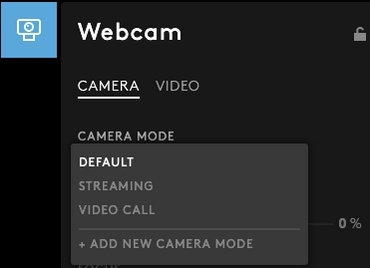
CAMERA
Camera mode comes with three presets:
- DEFAULT
- STREAMING
- VIDEO CALL
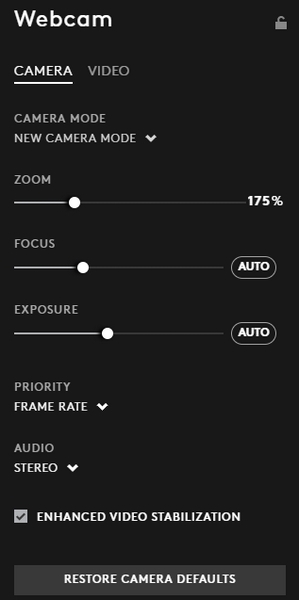
To create your own zoom, focus, and exposure settings, you will need to create a new camera mode.
Here’s how:
- On the CAMERA tab dropdown menu, click ADD NEW CAMERA MODE.
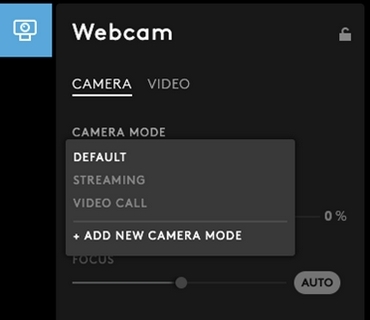
- Adjust the settings under New Camera Mode to suit your requirements.
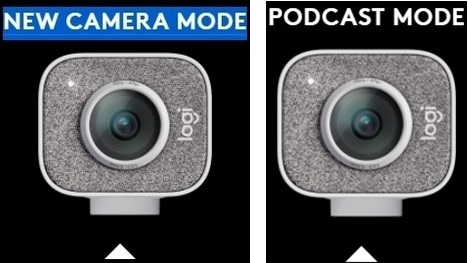
- Click on the NEW CAMERA MODE text above the webcam picture to rename the new mode. Type a name to identify the new settings. In the example, we’ve named the new camera mode PODCAST MODE.
Important Notice: The Firmware Update Tool is no longer supported or maintained by Logitech. We highly recommend using Logi Options+ for your supported Logitech devices. We are here to assist you during this transition.
Important Notice: The Logitech Preference Manager is no longer supported or maintained by Logitech. We highly recommend using Logi Options+ for your supported Logitech devices. We are here to assist you during this transition.
Important Notice: The Logitech Control Center is no longer supported or maintained by Logitech. We highly recommend using Logi Options+ for your supported Logitech devices. We are here to assist you during this transition.
Important Notice: The Logitech Connection Utility is no longer supported or maintained by Logitech. We highly recommend using Logi Options+ for your supported Logitech devices. We are here to assist you during this transition.
Important Notice: The Unifying Software is no longer supported or maintained by Logitech. We highly recommend using Logi Options+ for your supported Logitech devices. We are here to assist you during this transition.
Important Notice: The SetPoint software is no longer supported or maintained by Logitech. We highly recommend using Logi Options+ for your supported Logitech devices. We are here to assist you during this transition.
Frequently Asked Questions
There are no products available for this section
There are no Downloads for this Product
There are no Downloads for this Version.
Compatible Product
