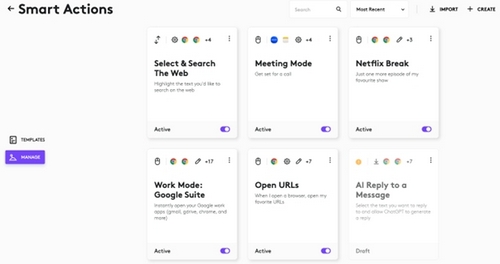
Once you’ve created Smart Actions, you will be able to access them using the Manage tab. All the Smart Actions created will live here, including ones that are still in draft mode.
Draft Smart Actions are actions which are not set up correctly because they are missing an application with the actions:
Updating Smart Actions:
Use the context menu on the top right corner of the Smart Actions card. There are four options: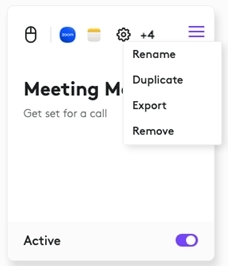
- Rename the Smart Action — change the name and the description
- Add label - makes it easier to filter Smart Actions
- Duplicate creates a copy of current Smart Actions
- Export lets you save your Smart Actions as a .json file. You can share this file with your colleagues and friends, so that they can use Smart Actions that you have created
- Remove lets you permanently delete your Smart Actions from your list
Use the Active toggle on the bottom of the card to turn off the Actions. Smart Actions are active by default — they are executed as soon as you trigger them.
Bemærk! Firmwareopdateringsværktøjet understøttes/vedligeholdes ikke længere af Logitech. Vi anbefaler, at du bruger Logi Options+ til dine understøttede Logitech-enheder. Vi står klar til at hjælpe dig igennem denne overgang.
Bemærk! Logitech Preference Manager understøttes/vedligeholdes ikke længere af Logitech. Vi anbefaler, at du bruger Logi Options+ til dine understøttede Logitech-enheder. Vi står klar til at hjælpe dig igennem denne overgang.
Bemærk! Logitech Control Center understøttes/vedligeholdes ikke længere af Logitech. Vi anbefaler, at du bruger Logi Options+ til dine understøttede Logitech-enheder. Vi står klar til at hjælpe dig igennem denne overgang.
Bemærk! Logitech Connection Utility understøttes/vedligeholdes ikke længere af Logitech. Vi anbefaler, at du bruger Logi Options+ til dine understøttede Logitech-enheder. Vi står klar til at hjælpe dig igennem denne overgang.
Bemærk! Unifying-softwaren understøttes/vedligeholdes ikke længere af Logitech. Vi anbefaler, at du bruger Logi Options+ til dine understøttede Logitech-enheder. Vi står klar til at hjælpe dig igennem denne overgang.
Bemærk! SetPoint-softwaren understøttes eller vedligeholdes ikke længere af Logitech. Vi anbefaler, at du bruger Logi Options+ til dine understøttede Logitech-enheder. Vi står klar til at hjælpe dig igennem denne overgang.
Ofte stillede spørgsmål
Der er ingen tilgængelige produkter til dette afsnit
Der er ingen downloads til dette produkt
Der er ingen Downloads til denne version.
Compatible Product
