If you installed one of the beta versions of MIXLINE and then upgrade to the public 1.0 release of MIXLINE, you might encounter an issue where MIXLINE is unexpectedly uninstalled after you reboot your computer. A hotfix is coming to address the issue for the future.
Until then, if you’re experiencing this issue there are some manual steps that you can take to resolve it:
- Download the 1.0 installer. The file should be MIXLINE-1.0.59.3453.msi.
- Double-click on MIXLINE-1.0.59.3453.msi.
- You'll see a dialog prompting you to locate the MSI installation package. It should reference 1.0.59.3453 under a MIXLINE\updates directory.
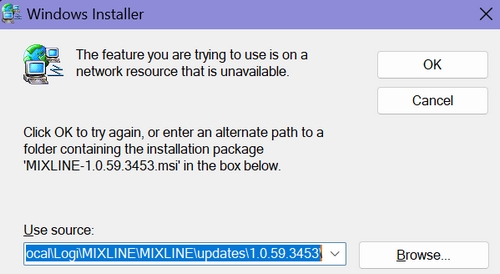
- Browse and pick the MSI file that you just double-clicked, which should be MIXLINE-1.0.59.3453.msi.
You'll see a Modify/Repair/Remove dialog box.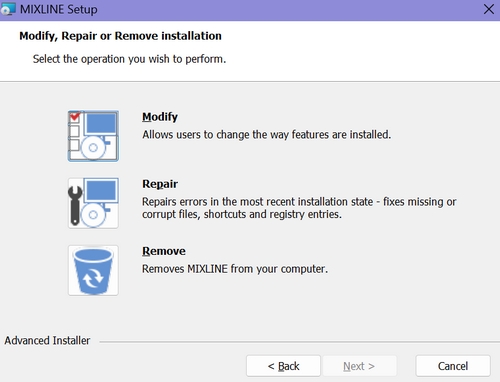
- Choose the Remove option. It will make some progress, and then you'll see an error letting you know that there's a problem with the installer.
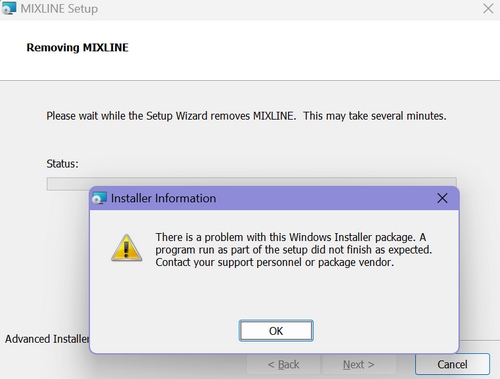
- Click OK.
- Double-click the MSI file again. This time it should install correctly.
Wichtiger Hinweis: Das Firmware Update Tool wird von Logitech nicht mehr unterstützt oder gepflegt. Wir empfehlen dringend die Verwendung von Logi Options+ für Ihre unterstützten Logitech-Geräte. Während dieser Übergangsphase stehen wir Ihnen gern zur Seite.
Wichtiger Hinweis: Der Logitech Preference Manager wird nicht mehr von Logitech unterstützt oder gepflegt. Wir empfehlen dringend die Verwendung von Logi Options+ für Ihre unterstützten Logitech-Geräte. Während dieser Übergangsphase stehen wir Ihnen gern zur Seite.
Wichtiger Hinweis: Das Logitech Control Center wird nicht mehr von Logitech unterstützt oder gepflegt. Wir empfehlen dringend die Verwendung von Logi Options+ für Ihre unterstützten Logitech-Geräte. Während dieser Übergangsphase stehen wir Ihnen gern zur Seite.
Wichtiger Hinweis: Logitech Connection Utility wird von Logitech nicht mehr unterstützt oder gepflegt. Wir empfehlen dringend die Verwendung von Logi Options+ für Ihre unterstützten Logitech-Geräte. Während dieser Übergangsphase stehen wir Ihnen gern zur Seite.
Wichtiger Hinweis: Die Unifying-Software wird von Logitech nicht mehr unterstützt oder gepflegt. Wir empfehlen dringend die Verwendung von Logi Options+ für Ihre unterstützten Logitech-Geräte. Während dieser Übergangsphase stehen wir Ihnen gern zur Seite.
Wichtiger Hinweis: Die SetPoint-Software wird von Logitech nicht mehr unterstützt oder gewartet. Wir empfehlen dringend die Verwendung von Logi Options+ für Ihre unterstützten Logitech-Geräte. Während dieser Übergangsphase stehen wir Ihnen gern zur Seite.
Häufig gestellte Fragen – FAQs
Für diesen Abschnitt sind keine Produkte verfügbar
Für dieses Produkt sind keine Downloads vorhanden
Für diese Version gibt es keine Downloads.
Compatible Product
