What is the Logi Options+ Mobile App?
The Logi Options+ Mobile App for iPadOS is an updated version of the Logitech Control app that facilitates firmware updates for certain Logitech devices that are connected to an iPad using a Smart Connector or Bluetooth.
For all compatible devices, iPadOS 15 or later is required to use this app.
You can either download the app from Apple’s App store or update your existing Logitech Control app.
What devices are compatible with the Logi Options+ Mobile App on iPadOS?
Below are the devices supported for firmware updates only on the Logi Options+ Mobile App:
| Combo Touch for iPad Air 11-inch (M2) | Folio Touch for iPad Pro 11-inch (1st and 2nd generation) |
| Combo Touch for iPad Air 13-inch (M2) | Folio Touch for iPad Air (4th generation) |
| Combo Touch for iPad Pro 11-inch (M4) | Slim Combo for iPad Pro 12.9-inch (1st and 2nd generation) |
| Combo Touch for iPad Pro 13-inch (M4) | Slim Combo for iPad Pro 10.5-inch and iPad Air (3rd generation) |
| Combo Touch for iPad Pro 12.9-inch (5th and 6th generation) | Slim Folio Pro for iPad Pro 11-inch (1st, 2nd, and 3rd generation) |
| Combo Touch for iPad Pro 11-inch | Slim Folio Pro for iPad Pro 12.9-inch (3rd and 4th generation) |
| Combo Touch for iPad Air (4th generation +) | Slim Folio for iPad (7th, 8th, and 9th generation) |
| Combo Touch for iPad (7th–9th generation) | Slim Folio for iPad 10.9-inch (10th generation) |
| Combo Touch for iPad 10.9-inch (10th generation) | Slim Folio for iPad Air (3rd generation) |
| Keys-To-Go 2 | Rugged Folio for iPad 10.9-inch (10th generation) |
Below are the devices supported for firmware updates as well as key customization on the Logi Options+ Mobile App:
- Flip Folio
What are the permissions required for the Logi Options+ Mobile App on iPadOS?
The Logi Options+ Mobile App requires the following permissions to enable device features:
- Bluetooth
If the application does not have Bluetooth permissions, it will not be able to detect the device and list it. To enable Bluetooth permissions, open Settings > Apps > Logi Options+ Mobile > Bluetooth
Flip Folio Shortcut Keys
Flip Folio includes a top row of keys that can be customized on installation of the Logi Options+ Mobile app on your iPadOS. Only the highlighted keys (shown) can be personalized using the Logi Options+ Mobile app:
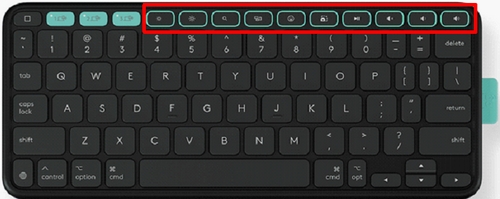
The following table lists the default functionality of each key. The key description is ordered from left to right.
 |
Home |
 |
Easy-Switch 1 |
 |
Easy-Switch 2 |
 |
Easy-Switch 3 |
 |
Screen Brightness Down |
 |
Screen Brightness Up |
 |
Spotlight |
 |
Mission Control |
 |
Emoji |
 |
Screen Capture |
 |
Play/Pause |
 |
Volume Mute |
 |
Volume Down |
 |
Volume Up |
What is the Key Customization for Flip Folio on the Logi Options+ Mobile App for iPadOS?
If you have a Flip Folio, you can customize your keys using the Logi Options+ Mobile app once you’ve paired your device with the iPad. Here’s how:
In the Logi Options+ Mobile App, select Flip Folio and then tap Keys.
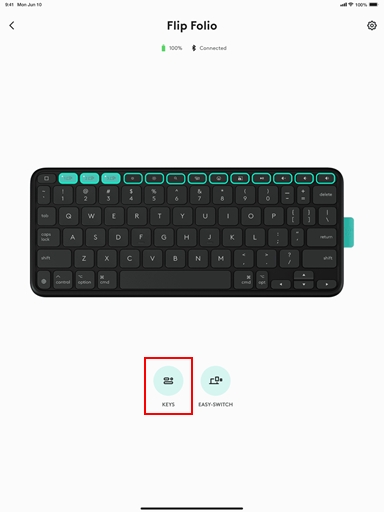
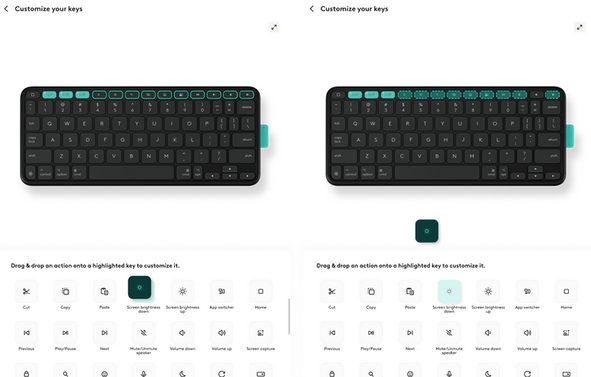
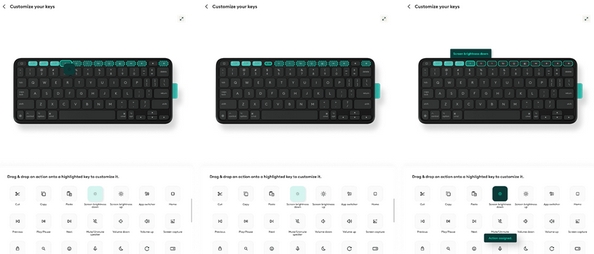
You can drag and drop an action to any of the highlighted keys on the keyboard. Once the action has been assigned to a key, by pressing that key, the action will be executed.
Σημαντική σημείωση: Το Firmware Update Tool δεν υποστηρίζεται ούτε συντηρείται πλέον από τη Logitech. Συνιστούμε να χρησιμοποιήσετε ανεπιφύλακτα το Logi Options+ για τις δικές σας υποστηριζόμενες συσκευές Logitech . Είμαστε εδώ για να σας βοηθήσουμε κατά τη διάρκεια αυτής της μετάβασης.
Σημαντική σημείωση: Το Logitech Preference Manager δεν υποστηρίζεται ή συντηρείται πλέον από τη Logitech. Συνιστούμε να χρησιμοποιήσετε ανεπιφύλακτα το Logi Options+ για τις δικές σας υποστηριζόμενες συσκευές Logitech . Είμαστε εδώ για να σας βοηθήσουμε κατά τη διάρκεια αυτής της μετάβασης.
Σημαντική σημείωση: Το Logitech Control Center δεν υποστηρίζεται ούτε συντηρείται πλέον από τη Logitech. Συνιστούμε να χρησιμοποιήσετε ανεπιφύλακτα το Logi Options+ για τις δικές σας υποστηριζόμενες συσκευές Logitech . Είμαστε εδώ για να σας βοηθήσουμε κατά τη διάρκεια αυτής της μετάβασης.
Σημαντική σημείωση: Το Logitech Connection Utility δεν υποστηρίζεται ή συντηρείται πλέον από τη Logitech. Συνιστούμε να χρησιμοποιήσετε ανεπιφύλακτα το Logi Options+ για τις δικές σας υποστηριζόμενες συσκευές Logitech . Είμαστε εδώ για να σας βοηθήσουμε κατά τη διάρκεια αυτής της μετάβασης.
Σημαντική σημείωση: Το λογισμικό Unifying δεν υποστηρίζεται ή συντηρείται πλέον από τη Logitech. Συνιστούμε να χρησιμοποιήσετε ανεπιφύλακτα το Logi Options+ για τις δικές σας υποστηριζόμενες συσκευές Logitech . Είμαστε εδώ για να σας βοηθήσουμε κατά τη διάρκεια αυτής της μετάβασης.
Σημαντική σημείωση: Το λογισμικό SetPoint δεν υποστηρίζεται ούτε συντηρείται πλέον από τη Logitech. Συνιστούμε να χρησιμοποιήσετε ανεπιφύλακτα το Logi Options+ για τις δικές σας υποστηριζόμενες συσκευές Logitech . Είμαστε εδώ για να σας βοηθήσουμε κατά τη διάρκεια αυτής της μετάβασης.
Συνήθεις ερωτήσεις
Δεν υπάρχουν διαθέσιμα προϊόντα για αυτήν την ενότητα
Δεν υπάρχουν στοιχεία λήψης για αυτό το προϊόν
Δεν υπάρχουν στοιχεία λήψης για αυτήν την έκδοση.
Compatible Product
