Circle View Camera is designed with your privacy and security in mind through its hardware and software experiences.
Hardware Privacy Features
- The camera allows you to tilt the camera head towards the base to quickly obscure the camera’s view. NOTE: This does not disable the video or the audio.
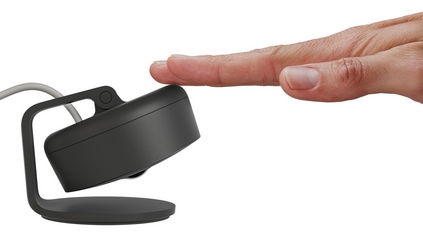
- The button on the back of the camera allows you to manually disable the camera audio and video for complete privacy. The live stream in the home app will let you know that the camera has been manually disabled and you will not see any recordings on the camera if these have been allowed. If the camera has been unplugged and replugged in, the last state will be remembered.
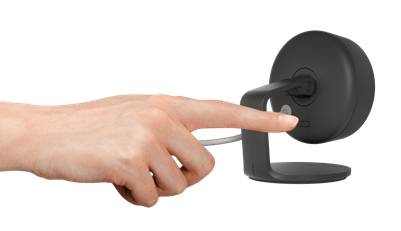
To use this feature, the camera needs to be plugged in, set up and connected. Press the button on the back of the camera and let go when you hear a single beep / see the Status LED turn solid magenta.
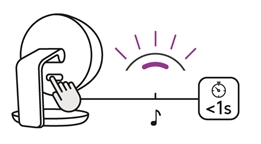
If you had the Status LED enabled, you will see that the LED turns off when the camera has been manually disabled.
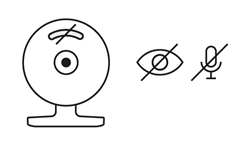
NOTE: The button needs to be pressed again to enable the video and audio.
Software Privacy and Security Features
Circle View Camera only works with Apple HomeKit and supports Apple HomeKit Secure Video to provide layers of privacy and security for you and your video footage. In this scenario:
- Account and credential protection is managed by Apple;
- Any smart analysis on the activity detected by the camera is privately analyzed by the Apple Home Hub device (part of Apple HomeKit Secure Video requirements) using on‑device intelligence.
- All recordings and live streams for the Cameras are end-to-end encrypted, with no ability for Apple or Logitech to access the audio/video data;
- Recorded video is securely stored for free in supported iCloud accounts for the duration of time stated as part of Apple’s HomeKit Secure Video offering and automatically deleted after this time with no ability for Apple or Logitech to retrieve the audio/video data;
- Fully supports routers secured by HomeKit which provide an ever greater level of security for your home network and the devices within it.
- HomeKit enables control over when the camera allows streaming, allows recording, and when the camera is turned off based on the viewing device’s location - at home or away.
- When the Status LED is enabled, there are different states that let people in front of the camera know when the camera allows streaming, allows streaming and recording and when someone is watching the live stream.
Visit the Apple HomeKit Privacy Page for more information on privacy.
Visit Use HomeKit Secure Video for more information on settings.
Σημαντική σημείωση: Το Firmware Update Tool δεν υποστηρίζεται ούτε συντηρείται πλέον από τη Logitech. Συνιστούμε να χρησιμοποιήσετε ανεπιφύλακτα το Logi Options+ για τις δικές σας υποστηριζόμενες συσκευές Logitech . Είμαστε εδώ για να σας βοηθήσουμε κατά τη διάρκεια αυτής της μετάβασης.
Σημαντική σημείωση: Το Logitech Preference Manager δεν υποστηρίζεται ή συντηρείται πλέον από τη Logitech. Συνιστούμε να χρησιμοποιήσετε ανεπιφύλακτα το Logi Options+ για τις δικές σας υποστηριζόμενες συσκευές Logitech . Είμαστε εδώ για να σας βοηθήσουμε κατά τη διάρκεια αυτής της μετάβασης.
Σημαντική σημείωση: Το Logitech Control Center δεν υποστηρίζεται ούτε συντηρείται πλέον από τη Logitech. Συνιστούμε να χρησιμοποιήσετε ανεπιφύλακτα το Logi Options+ για τις δικές σας υποστηριζόμενες συσκευές Logitech . Είμαστε εδώ για να σας βοηθήσουμε κατά τη διάρκεια αυτής της μετάβασης.
Σημαντική σημείωση: Το Logitech Connection Utility δεν υποστηρίζεται ή συντηρείται πλέον από τη Logitech. Συνιστούμε να χρησιμοποιήσετε ανεπιφύλακτα το Logi Options+ για τις δικές σας υποστηριζόμενες συσκευές Logitech . Είμαστε εδώ για να σας βοηθήσουμε κατά τη διάρκεια αυτής της μετάβασης.
Σημαντική σημείωση: Το λογισμικό Unifying δεν υποστηρίζεται ή συντηρείται πλέον από τη Logitech. Συνιστούμε να χρησιμοποιήσετε ανεπιφύλακτα το Logi Options+ για τις δικές σας υποστηριζόμενες συσκευές Logitech . Είμαστε εδώ για να σας βοηθήσουμε κατά τη διάρκεια αυτής της μετάβασης.
Σημαντική σημείωση: Το λογισμικό SetPoint δεν υποστηρίζεται ούτε συντηρείται πλέον από τη Logitech. Συνιστούμε να χρησιμοποιήσετε ανεπιφύλακτα το Logi Options+ για τις δικές σας υποστηριζόμενες συσκευές Logitech . Είμαστε εδώ για να σας βοηθήσουμε κατά τη διάρκεια αυτής της μετάβασης.
Συνήθεις ερωτήσεις
Δεν υπάρχουν διαθέσιμα προϊόντα για αυτήν την ενότητα
Δεν υπάρχουν στοιχεία λήψης για αυτό το προϊόν
Δεν υπάρχουν στοιχεία λήψης για αυτήν την έκδοση.
Compatible Product
