- Bring your Circle 2 Wire-Free camera inside, preferably close to your router.
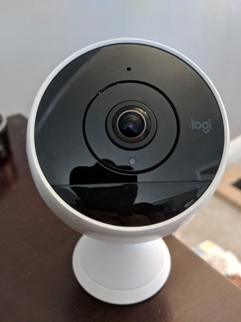
- Cover the PIR sensor either with your hand or with BLACK electric tape. The PIR sensor is directly below your camera lens and runs along the bottom third of your camera.
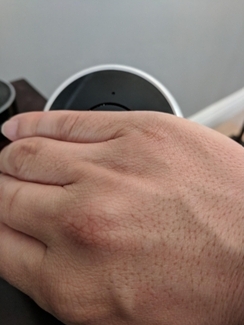
- If the red IR LED is ON wait until it is OFF. As soon as the red IR LED light turns OFF, START the timer on your stopwatch. Do not move your hand.
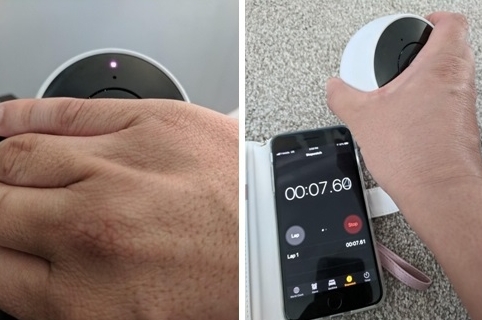
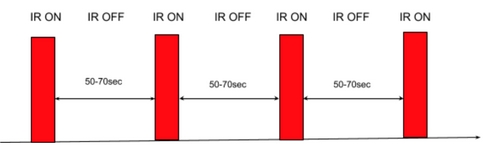
- Wait. Allow your stopwatch to continue running while the LED if off.
- When the red LED turns back on again, stop your timer, then re-start when the IR is OFF. Write down the time on the stopwatch before you re-start it.
NOTE: If the red IR LED is OFF for more than 150 seconds, your router does not have this issue. - Measure time when IR LED is OFF FOUR times.
In a nutshell, your router is ignoring data being sent from our servers intended for your camera, thus keeping the camera from staying asleep, inadvertently draining your battery rapidly.
Important Notice: The Firmware Update Tool is no longer supported or maintained by Logitech. We highly recommend using Logi Options+ for your supported Logitech devices. We are here to assist you during this transition.
Important Notice: The Logitech Preference Manager is no longer supported or maintained by Logitech. We highly recommend using Logi Options+ for your supported Logitech devices. We are here to assist you during this transition.
Important Notice: The Logitech Control Center is no longer supported or maintained by Logitech. We highly recommend using Logi Options+ for your supported Logitech devices. We are here to assist you during this transition.
Important Notice: The Logitech Connection Utility is no longer supported or maintained by Logitech. We highly recommend using Logi Options+ for your supported Logitech devices. We are here to assist you during this transition.
Important Notice: The Unifying Software is no longer supported or maintained by Logitech. We highly recommend using Logi Options+ for your supported Logitech devices. We are here to assist you during this transition.
Important Notice: The SetPoint software is no longer supported or maintained by Logitech. We highly recommend using Logi Options+ for your supported Logitech devices. We are here to assist you during this transition.
Frequently Asked Questions
There are no products available for this section
There are no Downloads for this Product
There are no Downloads for this Version.
Compatible Product
