The LIGHTSYNC tab  lets you control the lighting settings for your device. By default, the LIGHTSYNC color wheel comes with four prefilled swatches, with four more that can be added. Once a swatch is added, it can't be removed, but you can change the color.
Default LIGHTSYNC settings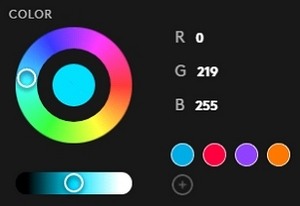
To add another color:
- Click on the color wheel to select the desired color.
- Adjust the brightness slider if needed.
Add the color to the swatch list by clicking
 (plus sign) which creates a new swatch.

To change an existing swatch to a different color:
- Click on the color wheel to select the desired color.
- Adjust the brightness slider if needed.
Add the color to the swatch list by dragging the color wheel swatch onto the swatch you want to update.

Important Notice: The Firmware Update Tool is no longer supported or maintained by Logitech. We highly recommend using Logi Options+ for your supported Logitech devices. We are here to assist you during this transition.
Important Notice: The Logitech Preference Manager is no longer supported or maintained by Logitech. We highly recommend using Logi Options+ for your supported Logitech devices. We are here to assist you during this transition.
Important Notice: The Logitech Control Center is no longer supported or maintained by Logitech. We highly recommend using Logi Options+ for your supported Logitech devices. We are here to assist you during this transition.
Important Notice: The Logitech Connection Utility is no longer supported or maintained by Logitech. We highly recommend using Logi Options+ for your supported Logitech devices. We are here to assist you during this transition.
Important Notice: The Unifying Software is no longer supported or maintained by Logitech. We highly recommend using Logi Options+ for your supported Logitech devices. We are here to assist you during this transition.
Important Notice: The SetPoint software is no longer supported or maintained by Logitech. We highly recommend using Logi Options+ for your supported Logitech devices. We are here to assist you during this transition.
Frequently Asked Questions
There are no products available for this section
There are no Downloads for this Product
There are no Downloads for this Version.
Compatible Product
