Digital Media Receiver or Digital Video Player products (WD TV Media Player, Vudu Movie Player, etc...) are categorized as Media Center PC's in the Harmony device database.
To add one of these products to your Harmony remote, follow these steps:
- Launch the Logitech Harmony remote control software and login to your account
- Click on the Devices tab
- Click on the Add Device button
-
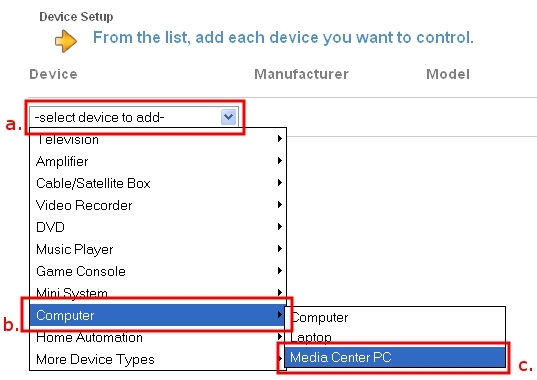
- Click on the -select device to add- dropdown
- Select Computer
- Select Media Center PC
-
- Click on the -select manufacturer- dropdown
- For manufacturer, select the manufacturer of your device. In this example, we will use a Western Digital WD TV HD Media Player
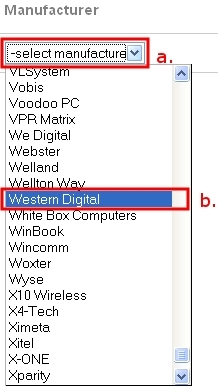
- For model, enter the model number of your device

- Click on the
 button
 -
Confirm that you've entered in all of the information correctly, then click on the
button to save your changes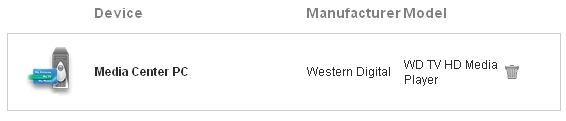
Once correctly added, you can create an activity. For additional information on creating an activity, please see article 360023384993 - How do I add an activity to my Harmony Remote?
Important Notice: The Firmware Update Tool is no longer supported or maintained by Logitech. We highly recommend using Logi Options+ for your supported Logitech devices. We are here to assist you during this transition.
Important Notice: The Logitech Preference Manager is no longer supported or maintained by Logitech. We highly recommend using Logi Options+ for your supported Logitech devices. We are here to assist you during this transition.
Important Notice: The Logitech Control Center is no longer supported or maintained by Logitech. We highly recommend using Logi Options+ for your supported Logitech devices. We are here to assist you during this transition.
Important Notice: The Logitech Connection Utility is no longer supported or maintained by Logitech. We highly recommend using Logi Options+ for your supported Logitech devices. We are here to assist you during this transition.
Important Notice: The Unifying Software is no longer supported or maintained by Logitech. We highly recommend using Logi Options+ for your supported Logitech devices. We are here to assist you during this transition.
Important Notice: The SetPoint software is no longer supported or maintained by Logitech. We highly recommend using Logi Options+ for your supported Logitech devices. We are here to assist you during this transition.
Frequently Asked Questions
There are no products available for this section
There are no Downloads for this Product
There are no Downloads for this Version.
Compatible Product
