The firewall included in Mac OS X Snow Leopard (10.6) and Lion (10.7) may interfere with USB communication when you try to update your Harmony remote. To fix this issue, you'll need to disable the firewall before you update the Harmony remote.
To disable the Mac OS X firewall:
-
In the OS X menu bar, click Logitech Harmony Remote Software and then click Quit Logitech Harmony Remote Software.
-
Locate and launch Mac OS X System Preferences.
-
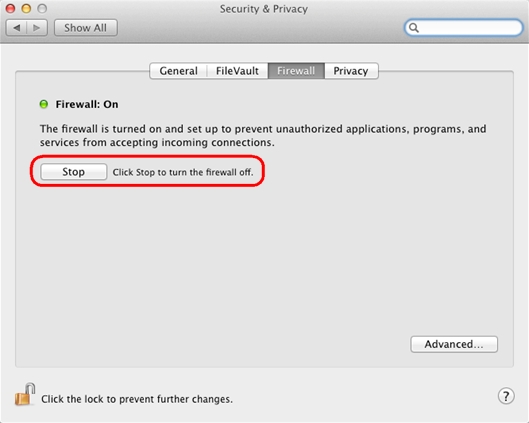
Click Security & Privacy (Security in Snow Leopard).
-
Click Firewall.
-
Click Stop to disable the firewall.
NOTE: Before you can click the Stop button, you might have to click the lock icon at the bottom of the window and authenticate using your OS X account information.
-
Launch the Logitech Harmony Remote Software and log in to your account.
-
Click Update Remote.
The software should now be able to communicate with the Harmony remote.
NOTE: When the update is complete, be sure to turn the Firewall back to On. To do this, click the Start button in the Firewall section of Security & Privacy.
Important Notice: The Firmware Update Tool is no longer supported or maintained by Logitech. We highly recommend using Logi Options+ for your supported Logitech devices. We are here to assist you during this transition.
Important Notice: The Logitech Preference Manager is no longer supported or maintained by Logitech. We highly recommend using Logi Options+ for your supported Logitech devices. We are here to assist you during this transition.
Important Notice: The Logitech Control Center is no longer supported or maintained by Logitech. We highly recommend using Logi Options+ for your supported Logitech devices. We are here to assist you during this transition.
Important Notice: The Logitech Connection Utility is no longer supported or maintained by Logitech. We highly recommend using Logi Options+ for your supported Logitech devices. We are here to assist you during this transition.
Important Notice: The Unifying Software is no longer supported or maintained by Logitech. We highly recommend using Logi Options+ for your supported Logitech devices. We are here to assist you during this transition.
Important Notice: The SetPoint software is no longer supported or maintained by Logitech. We highly recommend using Logi Options+ for your supported Logitech devices. We are here to assist you during this transition.
Frequently Asked Questions
There are no products available for this section
There are no Downloads for this Product
There are no Downloads for this Version.
Compatible Product
