- Open the Logitech Gaming Software:
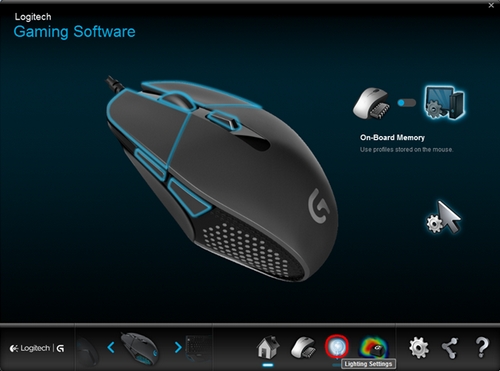
Start > All Programs > Logitech > Logitech Gaming Software 8.5.x - Click the Lighting Settings icon.
- In the Lighting Settings window, select your preferred settings. You can adjust the rate and brightness for the breathing effect, or disable them. To turn off illumination, drag the sliders under Breathing Effect and Brightness all the way to the left.
NOTE: If you want to turn off the Breathing Effect for the logo and sides of the mouse, you can control the illumination using the sliders under Brightness.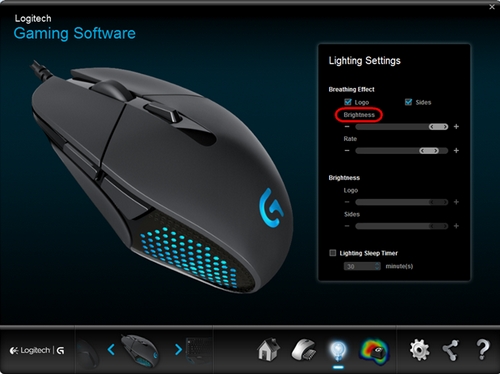
- To allow the mouse lighting to turn off after a period of inactivity, select the Lighting Sleep Timer option and set the number of minutes after which you want the lighting to turn off. The default is 30 minutes.
Important Notice: The Firmware Update Tool is no longer supported or maintained by Logitech. We highly recommend using Logi Options+ for your supported Logitech devices. We are here to assist you during this transition.
Important Notice: The Logitech Preference Manager is no longer supported or maintained by Logitech. We highly recommend using Logi Options+ for your supported Logitech devices. We are here to assist you during this transition.
Important Notice: The Logitech Control Center is no longer supported or maintained by Logitech. We highly recommend using Logi Options+ for your supported Logitech devices. We are here to assist you during this transition.
Important Notice: The Logitech Connection Utility is no longer supported or maintained by Logitech. We highly recommend using Logi Options+ for your supported Logitech devices. We are here to assist you during this transition.
Important Notice: The Unifying Software is no longer supported or maintained by Logitech. We highly recommend using Logi Options+ for your supported Logitech devices. We are here to assist you during this transition.
Important Notice: The SetPoint software is no longer supported or maintained by Logitech. We highly recommend using Logi Options+ for your supported Logitech devices. We are here to assist you during this transition.
Frequently Asked Questions
There are no products available for this section
There are no Downloads for this Product
There are no Downloads for this Version.
Compatible Product
