Connect using the USB receiver
-
Gently pull the receiver tab to remove the USB receiver from the Spotlight 2 remote.
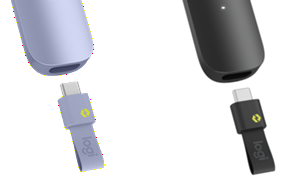
- Plug the receiver into a USB-C port on your computer. Press any button on the remote to power it on, and wait a moment while it automatically connects. When the connection is complete, the white LED will turn off.
Connect using Bluetooth
-
To enter pairing mode, press and hold the Next and Back buttons simultaneously for three seconds until the remote starts vibrating and the LED blinks rapidly.
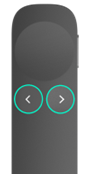
- Go to Bluetooth settings on your device and select Spotlight 2 in the list of discovered devices. Once connected, the white LED will turn off.
NOTE: The remote stays discoverable for three minutes and goes into deep sleep mode. To wake up, press any button.
For more information on pairing your Bluetooth device, see Connect your Logitech Bluetooth device.
TIP: To get the most out of your Spotlight 2, download and install the Logi Options+ App. You can get the app from logi.com/optionsplus.
Important Notice: The Firmware Update Tool is no longer supported or maintained by Logitech. We highly recommend using Logi Options+ for your supported Logitech devices. We are here to assist you during this transition.
Important Notice: The Logitech Preference Manager is no longer supported or maintained by Logitech. We highly recommend using Logi Options+ for your supported Logitech devices. We are here to assist you during this transition.
Important Notice: The Logitech Control Center is no longer supported or maintained by Logitech. We highly recommend using Logi Options+ for your supported Logitech devices. We are here to assist you during this transition.
Important Notice: The Logitech Connection Utility is no longer supported or maintained by Logitech. We highly recommend using Logi Options+ for your supported Logitech devices. We are here to assist you during this transition.
Important Notice: The Unifying Software is no longer supported or maintained by Logitech. We highly recommend using Logi Options+ for your supported Logitech devices. We are here to assist you during this transition.
Important Notice: The SetPoint software is no longer supported or maintained by Logitech. We highly recommend using Logi Options+ for your supported Logitech devices. We are here to assist you during this transition.
Frequently Asked Questions
There are no products available for this section
There are no Downloads for this Product
There are no Downloads for this Version.
Compatible Product
