The Next and Back buttons are designed for natural comfort and smooth, intuitive navigation. Their concave and convex surfaces make them easy to find by touch, so you can navigate slides without looking at the remote.
Next button
Click the Next button to move to the next slide. You can also swap the positions of the Next and Back buttons in Options+ if you prefer.
Back button
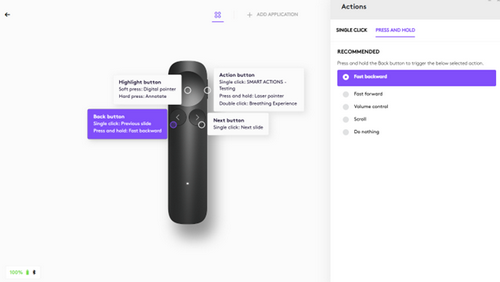
Click the Back button to move to the previous slide. You can also press and hold the button to trigger additional actions that you customize in Logi Options+, such as:
| Fast backward | Quickly move backward through slides |
| Fast forward | Quickly move forward through slides |
| Scroll* | Hold and move your hand up or down to scroll through web pages and documents. |
| Volume control* | Hold and move your hand up or down to adjust volume |
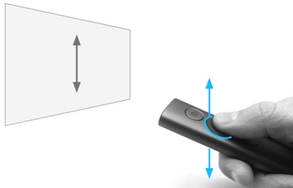
*The scroll and volume functions are gesture-based — hold the Back button and move your hand up or down to control them.
Important Notice: The Firmware Update Tool is no longer supported or maintained by Logitech. We highly recommend using Logi Options+ for your supported Logitech devices. We are here to assist you during this transition.
Important Notice: The Logitech Preference Manager is no longer supported or maintained by Logitech. We highly recommend using Logi Options+ for your supported Logitech devices. We are here to assist you during this transition.
Important Notice: The Logitech Control Center is no longer supported or maintained by Logitech. We highly recommend using Logi Options+ for your supported Logitech devices. We are here to assist you during this transition.
Important Notice: The Logitech Connection Utility is no longer supported or maintained by Logitech. We highly recommend using Logi Options+ for your supported Logitech devices. We are here to assist you during this transition.
Important Notice: The Unifying Software is no longer supported or maintained by Logitech. We highly recommend using Logi Options+ for your supported Logitech devices. We are here to assist you during this transition.
Important Notice: The SetPoint software is no longer supported or maintained by Logitech. We highly recommend using Logi Options+ for your supported Logitech devices. We are here to assist you during this transition.
Frequently Asked Questions
There are no products available for this section
There are no Downloads for this Product
There are no Downloads for this Version.
Compatible Product
