The scanning function is used to discover and activate the analog switches on your G512 X.
- When you activate the scanning function, you’ll see an animation on the keys and on the light bar.
- At the end of the animation, the G512 X will indicate where analog switches have been inserted with a color code for three seconds.
- After three seconds, it switches back to your selected lighting effect.
- Whenever you swap a switch, you’ll need to use the scanning function to make sure the G512 X knows your switch configuration.
- If the switch setup is not reflected as expected in G HUB, re-scan the keyboard.
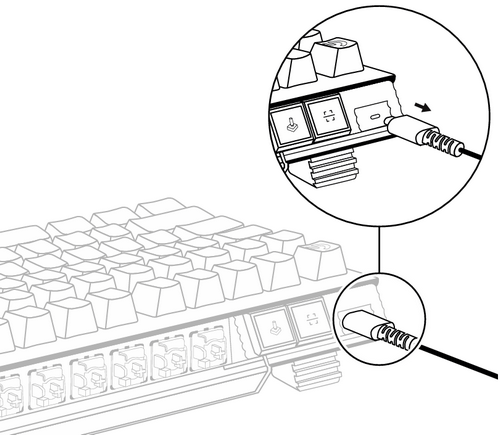
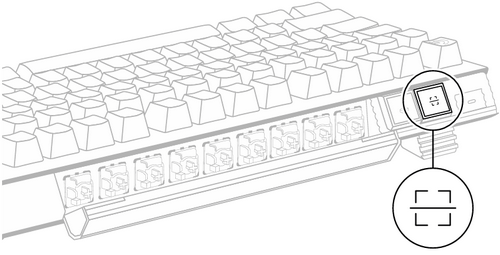
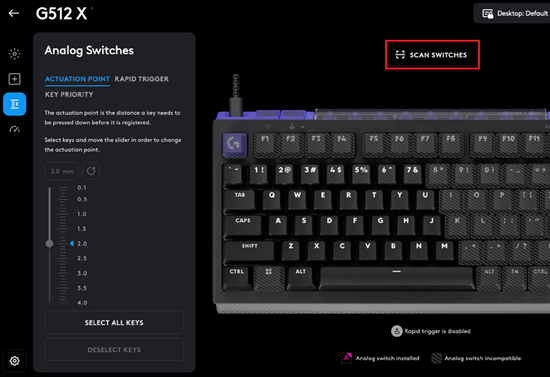
There are three ways to scan the G512 X after you swap switches:
-
Your G512 X will automatically scan after you un-plug and re-plug the keyboard from the computer when swapping the switches.
-
Alternatively, you can use the Scan button provided near the Type-C port on the keyboard to initiate a scan (shown below):
-
In G HUB, click SCAN SWITCHES on the right panel in the Analog Switches menu, as shown:
Important Notice: The Firmware Update Tool is no longer supported or maintained by Logitech. We highly recommend using Logi Options+ for your supported Logitech devices. We are here to assist you during this transition.
Important Notice: The Logitech Preference Manager is no longer supported or maintained by Logitech. We highly recommend using Logi Options+ for your supported Logitech devices. We are here to assist you during this transition.
Important Notice: The Logitech Control Center is no longer supported or maintained by Logitech. We highly recommend using Logi Options+ for your supported Logitech devices. We are here to assist you during this transition.
Important Notice: The Logitech Connection Utility is no longer supported or maintained by Logitech. We highly recommend using Logi Options+ for your supported Logitech devices. We are here to assist you during this transition.
Important Notice: The Unifying Software is no longer supported or maintained by Logitech. We highly recommend using Logi Options+ for your supported Logitech devices. We are here to assist you during this transition.
Important Notice: The SetPoint software is no longer supported or maintained by Logitech. We highly recommend using Logi Options+ for your supported Logitech devices. We are here to assist you during this transition.
Frequently Asked Questions
There are no products available for this section
There are no Downloads for this Product
There are no Downloads for this Version.
Compatible Product
