You can link your M850 L mouse to your K880 keyboard and switch both devices directly from your keyboard’s Easy-Switch keys. This way, you can work on multiple computers with one single keyboard and mouse. Here's how:
- Pair your mouse and your keyboard to both of your computers and install the Logi Options+ app on them.
NOTE: This function works only on Windows and Mac operating systems. -
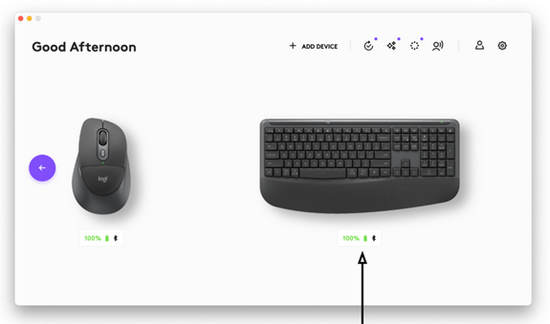
From any of your computers, open the Logi Options+ App and go to your keyboard's configuration page.
-
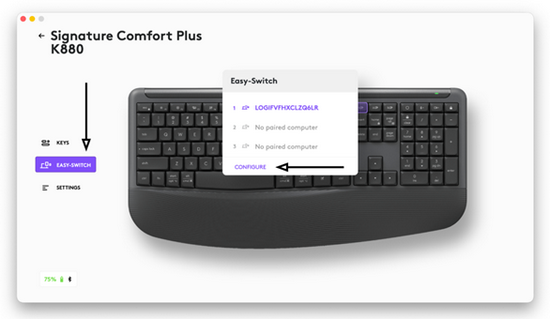
In the left panel, click the EASY- SWITCH tab, then select CONFIGURE from the pop-up menu in the middle of the window.
-
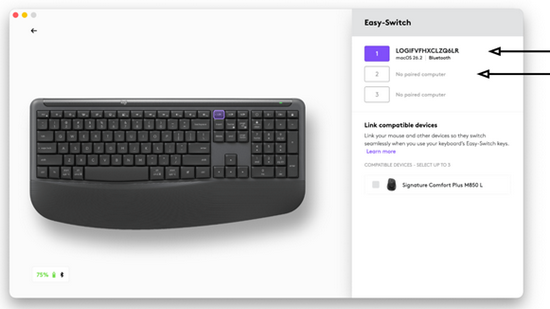
Make sure that at least two channels of your keyboard are connected to one computer each. Use the menu on the top right side of the window to confirm.
-
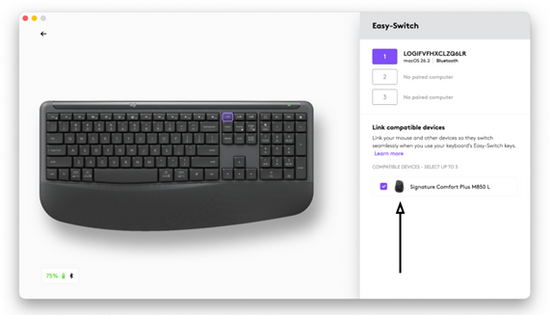
On the menu on the bottom right side of the window, you will see the compatible mice that you can pair to your keyboard. Tick the box next to the mouse and you’re all set. You have linked your mouse to your keyboard.
Important Notice: The Firmware Update Tool is no longer supported or maintained by Logitech. We highly recommend using Logi Options+ for your supported Logitech devices. We are here to assist you during this transition.
Important Notice: The Logitech Preference Manager is no longer supported or maintained by Logitech. We highly recommend using Logi Options+ for your supported Logitech devices. We are here to assist you during this transition.
Important Notice: The Logitech Control Center is no longer supported or maintained by Logitech. We highly recommend using Logi Options+ for your supported Logitech devices. We are here to assist you during this transition.
Important Notice: The Logitech Connection Utility is no longer supported or maintained by Logitech. We highly recommend using Logi Options+ for your supported Logitech devices. We are here to assist you during this transition.
Important Notice: The Unifying Software is no longer supported or maintained by Logitech. We highly recommend using Logi Options+ for your supported Logitech devices. We are here to assist you during this transition.
Important Notice: The SetPoint software is no longer supported or maintained by Logitech. We highly recommend using Logi Options+ for your supported Logitech devices. We are here to assist you during this transition.
Frequently Asked Questions
There are no products available for this section
There are no Downloads for this Product
There are no Downloads for this Version.
Compatible Product
