Rapid Trigger allows the key to release as soon as it lifts up, allowing for faster reactions. This value determines how far the key must be lifted before the key is released. Smaller values will release the key faster, while larger values will require the key to travel further up before releasing.
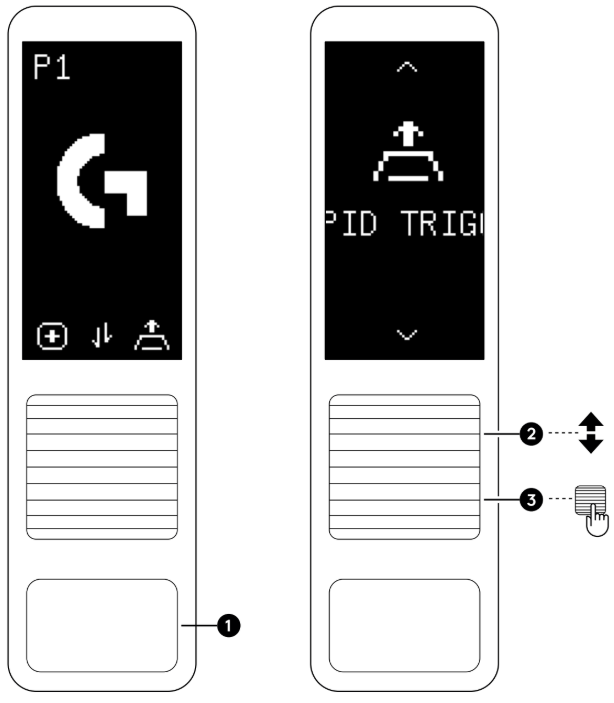
- Click the Menu Button to open the menu.
- Scroll to navigate to "RAPID TRIGGER"
- Click the Navigation Roller to enter the Rapid Trigger configuration menu.
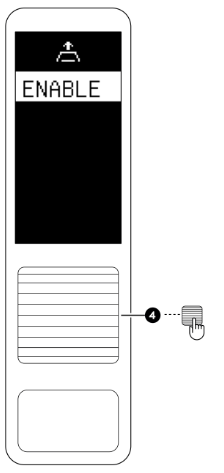
- Click the Navigation Roller to enable Rapid Trigger.
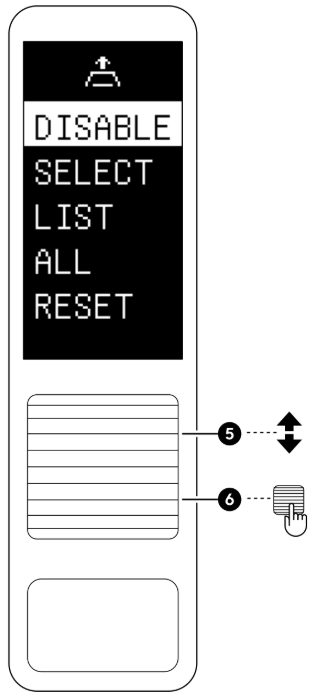
Note: If Rapid Trigger is already enabled, this screen will be skipped. - To configure Rapid Trigger, navigate to the preferred key selection option by scrolling the Navigation Roller.
- SELECT: Choose specific keys for Rapid Trigger customization. Existing groups can be deleted by long pressing the Navigation Roller.
- LIST: Configure Rapid Trigger individually for each key listed.
- ALL: Apply the Rapid Trigger configuration to every key simultaneously.
- Click the Navigation Roller to enter the Rapid Trigger configuration menu or to make a custom selection of keys.
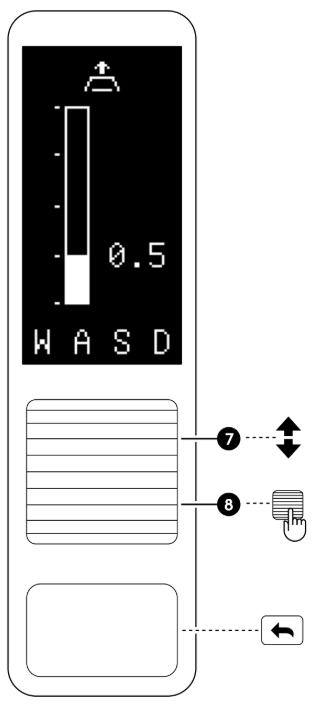
Note: Within this menu, you can also reset the Rapid Trigger configurations currently in place or disable Rapid Trigger. - Adjust the Rapid Trigger sensitivity by scrolling the Navigation Roller.
- Click the Navigation Roller to apply changes.
Note: Click the Menu Button if you wish to discard changes and return to the previous menu.
Important Notice: The Firmware Update Tool is no longer supported or maintained by Logitech. We highly recommend using Logi Options+ for your supported Logitech devices. We are here to assist you during this transition.
Important Notice: The Logitech Preference Manager is no longer supported or maintained by Logitech. We highly recommend using Logi Options+ for your supported Logitech devices. We are here to assist you during this transition.
Important Notice: The Logitech Control Center is no longer supported or maintained by Logitech. We highly recommend using Logi Options+ for your supported Logitech devices. We are here to assist you during this transition.
Important Notice: The Logitech Connection Utility is no longer supported or maintained by Logitech. We highly recommend using Logi Options+ for your supported Logitech devices. We are here to assist you during this transition.
Important Notice: The Unifying Software is no longer supported or maintained by Logitech. We highly recommend using Logi Options+ for your supported Logitech devices. We are here to assist you during this transition.
Important Notice: The SetPoint software is no longer supported or maintained by Logitech. We highly recommend using Logi Options+ for your supported Logitech devices. We are here to assist you during this transition.
Frequently Asked Questions
There are no products available for this section
There are no Downloads for this Product
There are no Downloads for this Version.
Compatible Product
