The Swift Pair pop-up only appears once. If you missed or closed it before clicking Connect, you can still pair your device manually.
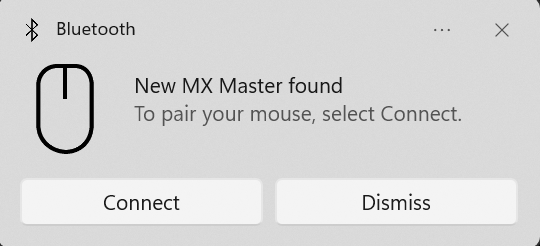
Use one of the following methods:
Method 1: Add the device from the Bluetooth menu (recommended)
- Make sure your device is switched on and its status LED is blinking quickly.
- On your PC, go to Settings > Bluetooth & devices.
- Select Add device, then Bluetooth.
- Choose your Logitech device from the list and wait for Connected to appear.
Method 2: Turn Bluetooth off and on
- Go to Settings > Bluetooth & devices and switch Bluetooth off.
- Wait a few seconds, then switch it back on.
- Switch your device off and on again, or long-press the connectivity button until the LED blinks quickly.
- The Swift Pair notification will appear. Click Connect.
Important Notice: The Firmware Update Tool is no longer supported or maintained by Logitech. We highly recommend using Logi Options+ for your supported Logitech devices. We are here to assist you during this transition.
Important Notice: The Logitech Preference Manager is no longer supported or maintained by Logitech. We highly recommend using Logi Options+ for your supported Logitech devices. We are here to assist you during this transition.
Important Notice: The Logitech Control Center is no longer supported or maintained by Logitech. We highly recommend using Logi Options+ for your supported Logitech devices. We are here to assist you during this transition.
Important Notice: The Logitech Connection Utility is no longer supported or maintained by Logitech. We highly recommend using Logi Options+ for your supported Logitech devices. We are here to assist you during this transition.
Important Notice: The Unifying Software is no longer supported or maintained by Logitech. We highly recommend using Logi Options+ for your supported Logitech devices. We are here to assist you during this transition.
Important Notice: The SetPoint software is no longer supported or maintained by Logitech. We highly recommend using Logi Options+ for your supported Logitech devices. We are here to assist you during this transition.
Frequently Asked Questions
There are no products available for this section
There are no Downloads for this Product
There are no Downloads for this Version.
Compatible Product
