The battery compartment is located on the top edge of your keyboard. To replace the batteries, you'll need four fresh CR2016 Lithium coin cell batteries,
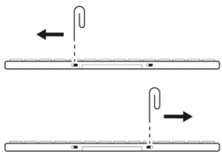
- Locate the two openings on either side of the battery tray.
- Insert a paper clip into each opening and slide the toggles away from the battery tray to unlock it.
- Using your fingernails or a shim, grip the tray from the underside of the keyboard and pull it out. This will require a little force.
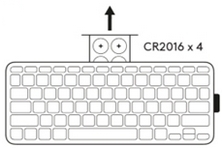
- Replace all four batteries with fresh CR2016 Lithium coin cell batteries, making sure the (+) image on the battery is facing up. Always replace all four batteries at the same time and do not mix battery brands.
- Slide the battery tray back into the keyboard module until it clicks into place.
- Use the paper clip to slide the toggles back toward the battery tray to lock it in position.
- Dispose of the old batteries following your regional regulations.

Important Notice: The Firmware Update Tool is no longer supported or maintained by Logitech. We highly recommend using Logi Options+ for your supported Logitech devices. We are here to assist you during this transition.
Important Notice: The Logitech Preference Manager is no longer supported or maintained by Logitech. We highly recommend using Logi Options+ for your supported Logitech devices. We are here to assist you during this transition.
Important Notice: The Logitech Control Center is no longer supported or maintained by Logitech. We highly recommend using Logi Options+ for your supported Logitech devices. We are here to assist you during this transition.
Important Notice: The Logitech Connection Utility is no longer supported or maintained by Logitech. We highly recommend using Logi Options+ for your supported Logitech devices. We are here to assist you during this transition.
Important Notice: The Unifying Software is no longer supported or maintained by Logitech. We highly recommend using Logi Options+ for your supported Logitech devices. We are here to assist you during this transition.
Important Notice: The SetPoint software is no longer supported or maintained by Logitech. We highly recommend using Logi Options+ for your supported Logitech devices. We are here to assist you during this transition.
Frequently Asked Questions
There are no products available for this section
There are no Downloads for this Product
There are no Downloads for this Version
Compatible Product
