You can configure the Watch TV button to use a particular input on your TV when you watch TV.
To change the Watch TV button
1. Go to myharmony.com and log in to your account.
2. From the Home page, click Change or Fix What a Button Does.

3. On the Change or Fix a Button - Device Selection page, select the device you want to make changes to and click OK.
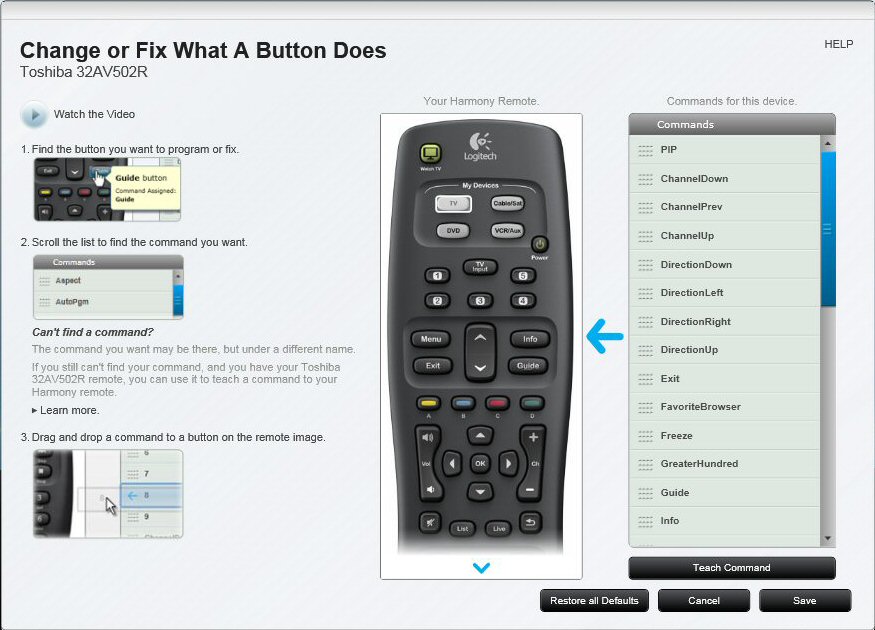
4. On the Change or Fix What a Button Does page, hover the mouse pointer over the Watch TV button on the remote image, and then click Setup.

5. To change which inputs are used when watching TV, click Show Advanced (Inputs).

6. From the Input drop-down list, select the input on your TV that you want to use when watching TV.
NOTE: If your TV does not support this feature, the Advanced (Inputs) section does not appear.
7. Click OK.
8. Click Sync Remote to update your remote with these settings.
Important Notice: The Firmware Update Tool is no longer supported or maintained by Logitech. We highly recommend using Logi Options+ for your supported Logitech devices. We are here to assist you during this transition.
Important Notice: The Logitech Preference Manager is no longer supported or maintained by Logitech. We highly recommend using Logi Options+ for your supported Logitech devices. We are here to assist you during this transition.
Important Notice: The Logitech Control Center is no longer supported or maintained by Logitech. We highly recommend using Logi Options+ for your supported Logitech devices. We are here to assist you during this transition.
Important Notice: The Logitech Connection Utility is no longer supported or maintained by Logitech. We highly recommend using Logi Options+ for your supported Logitech devices. We are here to assist you during this transition.
Important Notice: The Unifying Software is no longer supported or maintained by Logitech. We highly recommend using Logi Options+ for your supported Logitech devices. We are here to assist you during this transition.
Important Notice: The SetPoint software is no longer supported or maintained by Logitech. We highly recommend using Logi Options+ for your supported Logitech devices. We are here to assist you during this transition.
Frequently Asked Questions
There are no products available for this section
There are no Downloads for this Product
There are no Downloads for this Version
Compatible Product
