Follow these steps to update the firmware on your gaming mouse:
- Make sure that LGS 8.79 is installed on your PC. You can get the update from the product’s Download page.
- Connect the G502 RGB gaming mouse to a USB port on your computer.
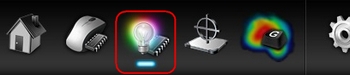
- Launch LGS and click the Lighting Settings icon.
- Click Update in the pop-up window to launch the firmware update utility.
NOTE: If you wish, check Do not show this message again to prevent the pop-up window from re-appearing. If you want to run the firmware update at a later time, you must manually run it from the following location: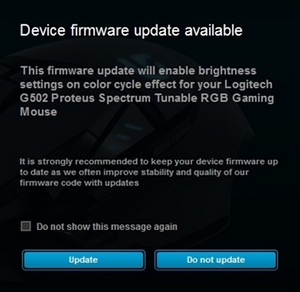
C:\Program Files\Logitech Gaming Software\FWUpdate\G502RGB
- Disconnect and reconnect your gaming mouse to begin the update.
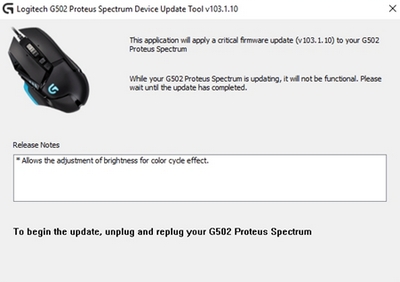
- Click Close once the firmware update is complete.
Important Notice: The Firmware Update Tool is no longer supported or maintained by Logitech. We highly recommend using Logi Options+ for your supported Logitech devices. We are here to assist you during this transition.
Important Notice: The Logitech Preference Manager is no longer supported or maintained by Logitech. We highly recommend using Logi Options+ for your supported Logitech devices. We are here to assist you during this transition.
Important Notice: The Logitech Control Center is no longer supported or maintained by Logitech. We highly recommend using Logi Options+ for your supported Logitech devices. We are here to assist you during this transition.
Important Notice: The Logitech Connection Utility is no longer supported or maintained by Logitech. We highly recommend using Logi Options+ for your supported Logitech devices. We are here to assist you during this transition.
Important Notice: The Unifying Software is no longer supported or maintained by Logitech. We highly recommend using Logi Options+ for your supported Logitech devices. We are here to assist you during this transition.
Important Notice: The SetPoint software is no longer supported or maintained by Logitech. We highly recommend using Logi Options+ for your supported Logitech devices. We are here to assist you during this transition.
Frequently Asked Questions
There are no products available for this section
There are no Downloads for this Product
There are no Downloads for this Version
Compatible Product
