The Alert Commander software should only be installed on a single computer that will act as your primary system for on-site viewing.
If you have the need to view from multiple computers on your network, such as a notebook computer, please use the Alert Web Viewer. Utilizing this web based utility will allow you to remotely view live video from any location with internet access.
To utilize the Web Viewer you must first create an account. This can be done within the Alert Commander software and was a step in the initial setup process. If this step was skipped, or you need to verify your account details, please follow these steps:
-
Launch Alert Commander and select the Settings button.
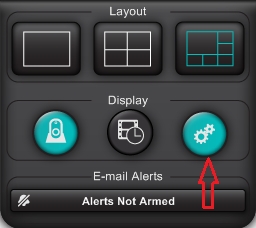
-
Locate the "Security and Web" drop down in the settings menu and select the Account option.
-
If you created an account, your "Account (E-mail)" details will be visible under the Basic section.
-
Visit http://alert.logitech.com and sign in with your account information.
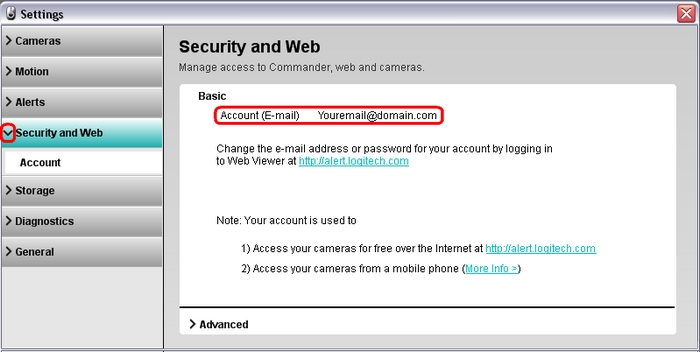
-
If you did not create an account, select the Advanced drop down.
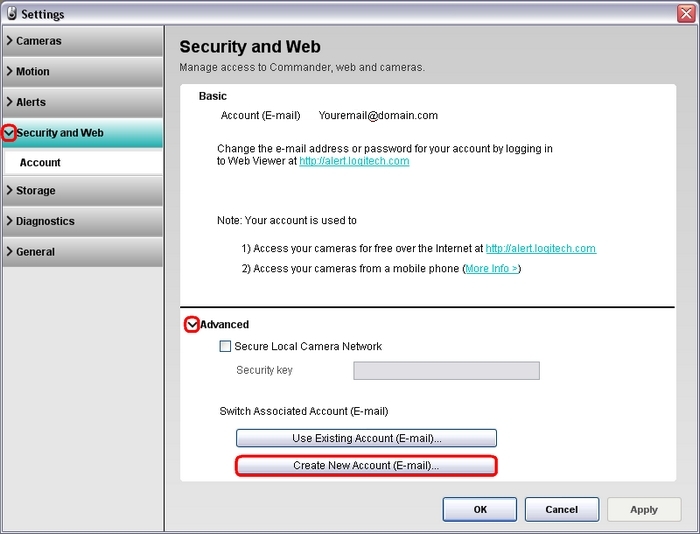
-
Click the "Create New Account (E-Mail)" button.
-
Fill in the required information to create an account.
-
Once the account is created, visit http://alert.logitech.com and sign in with your account information.
Additional information:
For additional details on supported Internet browsers, consult Knowledge Base article 360023393253.
Important Notice: The Firmware Update Tool is no longer supported or maintained by Logitech. We highly recommend using Logi Options+ for your supported Logitech devices. We are here to assist you during this transition.
Important Notice: The Logitech Preference Manager is no longer supported or maintained by Logitech. We highly recommend using Logi Options+ for your supported Logitech devices. We are here to assist you during this transition.
Important Notice: The Logitech Control Center is no longer supported or maintained by Logitech. We highly recommend using Logi Options+ for your supported Logitech devices. We are here to assist you during this transition.
Important Notice: The Logitech Connection Utility is no longer supported or maintained by Logitech. We highly recommend using Logi Options+ for your supported Logitech devices. We are here to assist you during this transition.
Important Notice: The Unifying Software is no longer supported or maintained by Logitech. We highly recommend using Logi Options+ for your supported Logitech devices. We are here to assist you during this transition.
Important Notice: The SetPoint software is no longer supported or maintained by Logitech. We highly recommend using Logi Options+ for your supported Logitech devices. We are here to assist you during this transition.
Frequently Asked Questions
There are no products available for this section
There are no Downloads for this Product
There are no Downloads for this Version
Compatible Product
