This article will guide users on how to properly re-connect the Music Receiver with the USB Music Transmitter using the Setup Wizard in the StreamPoint software.
The Music Receiver and the USB Music transmitter are pre-paired at the factory. If these 2 devices need to be re-connected, it can be done by launching the Setup Wizard from the Start Menu, and using the Ttroubleshoot Connection button.
To re-connect the Music Receiver with the USB Music Transmitter, do the following:
-
Launch Setup Wizard by clicking on Start > Programs > Logitech > StreamPoint > Setup Wizard.
-
Click Next until you see Music Receiver / Dock.
-
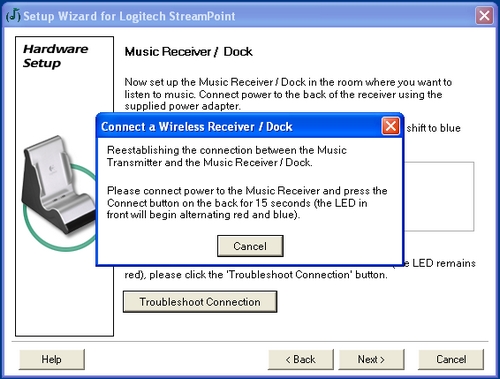
Click on Troubleshoot Connection (the Transmitter will enter discoverable mode by alternating the LED red and blue).
-
Connect the power on the Music Receiver.
-
Press and hold the Connect button at the back of the Receiver / Dock for 15 seconds (the LED in the front will begin alternating red and blue).
-
Specify a name for the room.
-
Click Next, then Finish.
-
Once communications has been established, both the LED on the USB Music Transmitter and Music Receiver will turn blue.
Important Notice: The Firmware Update Tool is no longer supported or maintained by Logitech. We highly recommend using Logi Options+ for your supported Logitech devices. We are here to assist you during this transition.
Important Notice: The Logitech Preference Manager is no longer supported or maintained by Logitech. We highly recommend using Logi Options+ for your supported Logitech devices. We are here to assist you during this transition.
Important Notice: The Logitech Control Center is no longer supported or maintained by Logitech. We highly recommend using Logi Options+ for your supported Logitech devices. We are here to assist you during this transition.
Important Notice: The Logitech Connection Utility is no longer supported or maintained by Logitech. We highly recommend using Logi Options+ for your supported Logitech devices. We are here to assist you during this transition.
Important Notice: The Unifying Software is no longer supported or maintained by Logitech. We highly recommend using Logi Options+ for your supported Logitech devices. We are here to assist you during this transition.
Important Notice: The SetPoint software is no longer supported or maintained by Logitech. We highly recommend using Logi Options+ for your supported Logitech devices. We are here to assist you during this transition.
Frequently Asked Questions
There are no products available for this section
There are no Downloads for this Product
There are no Downloads for this Version
Compatible Product
