Your Alert system provides the option to record audio. By default this option is disabled.
Depending on where you live, the use of recording devices may be prohibited. Be sure to comply with the laws in your country/state/locality when using Logitech Alert products and services.
To turn on audio so that the camera will record sound, follow these instructions:
-
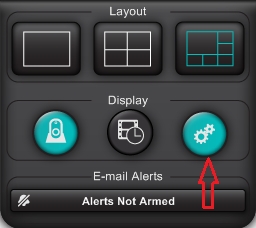
Launch Alert Commander and click the Settings button.
-
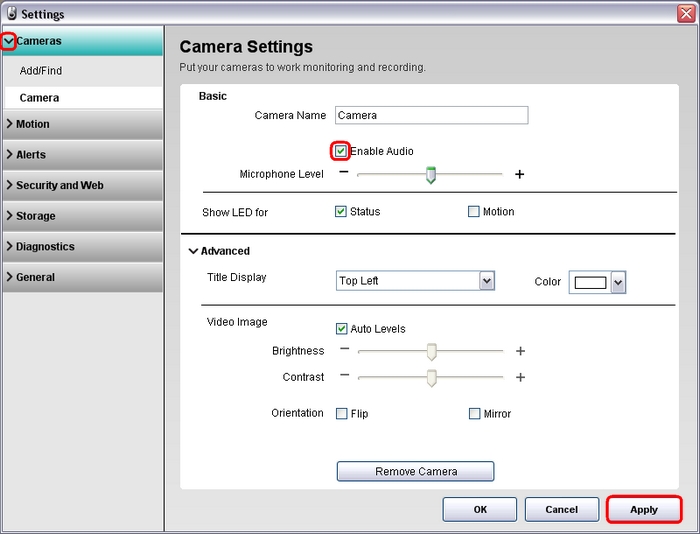
Click the Cameras option and Select the camera you want to turn audio on.
-
In the Basic section, locate the "Enable Audio" option.
-
To enable audio, click the checkbox so that a check mark displays.
-
Click the Apply button to save the setting.
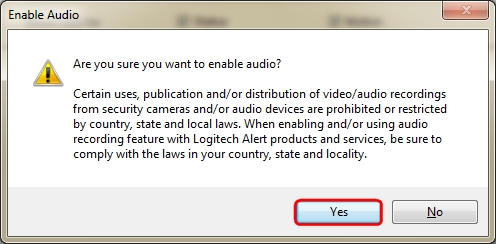
NOTE: Before audio will turn on, you must accept the disclaimer. The disclaimer will only show the first time Audio is enabled.
-
Click Yes to accept the message. The camera will begin recording audio.
Important Notice: The Firmware Update Tool is no longer supported or maintained by Logitech. We highly recommend using Logi Options+ for your supported Logitech devices. We are here to assist you during this transition.
Important Notice: The Logitech Preference Manager is no longer supported or maintained by Logitech. We highly recommend using Logi Options+ for your supported Logitech devices. We are here to assist you during this transition.
Important Notice: The Logitech Control Center is no longer supported or maintained by Logitech. We highly recommend using Logi Options+ for your supported Logitech devices. We are here to assist you during this transition.
Important Notice: The Logitech Connection Utility is no longer supported or maintained by Logitech. We highly recommend using Logi Options+ for your supported Logitech devices. We are here to assist you during this transition.
Important Notice: The Unifying Software is no longer supported or maintained by Logitech. We highly recommend using Logi Options+ for your supported Logitech devices. We are here to assist you during this transition.
Important Notice: The SetPoint software is no longer supported or maintained by Logitech. We highly recommend using Logi Options+ for your supported Logitech devices. We are here to assist you during this transition.
Frequently Asked Questions
There are no products available for this section
There are no Downloads for this Product
There are no Downloads for this Version
Compatible Product
