What is the Background Device Firmware update feature and what does it do?
Background Device Firmware Update (DFU) ensures your device installs the latest necessary firmware and security updates in the “DO NOT DISTURB” mode without interrupting your workflow. These updates protect your device from any known vulnerabilities and threats.
How does the Background DFU work?
Background DFU is meant to provide updates to your device without interrupting your workflow.
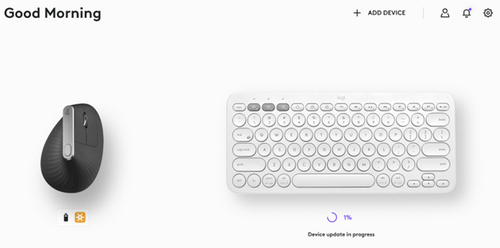
When you are on the Logi Options+ homepage and a device firmware update is happening in the background, you will still see a progress indicator with a message “Device update in progress”. You will be able to use the mouse while DFU is in progress.
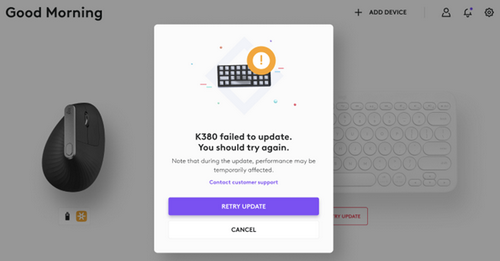
Once the device update is complete, you will see the message “Device Updated”. If an unforeseen error occurs, you will have the option to retry the update in which case, the DFU switches to manual mode which will require your intervention.
Will I be able to turn off Background DFU when it's running?
No, you won’t be able to turn off Background DFU as it is important for updates to not be interrupted.
Important Notice: The Firmware Update Tool is no longer supported or maintained by Logitech. We highly recommend using Logi Options+ for your supported Logitech devices. We are here to assist you during this transition.
Important Notice: The Logitech Preference Manager is no longer supported or maintained by Logitech. We highly recommend using Logi Options+ for your supported Logitech devices. We are here to assist you during this transition.
Important Notice: The Logitech Control Center is no longer supported or maintained by Logitech. We highly recommend using Logi Options+ for your supported Logitech devices. We are here to assist you during this transition.
Important Notice: The Logitech Connection Utility is no longer supported or maintained by Logitech. We highly recommend using Logi Options+ for your supported Logitech devices. We are here to assist you during this transition.
Important Notice: The Unifying Software is no longer supported or maintained by Logitech. We highly recommend using Logi Options+ for your supported Logitech devices. We are here to assist you during this transition.
Important Notice: The SetPoint software is no longer supported or maintained by Logitech. We highly recommend using Logi Options+ for your supported Logitech devices. We are here to assist you during this transition.
Frequently Asked Questions
There are no products available for this section
There are no Downloads for this Product
There are no Downloads for this Version
Compatible Product
