If your Samsung tablet stops responding to keyboard key presses in keyboard-supported apps, you can use the steps below to try to resolve the issue. Test the keyboard between each step to see if functionality is restored.
-
Power your keyboard off, and then back on, using the power switch at the top right of the keyboard.
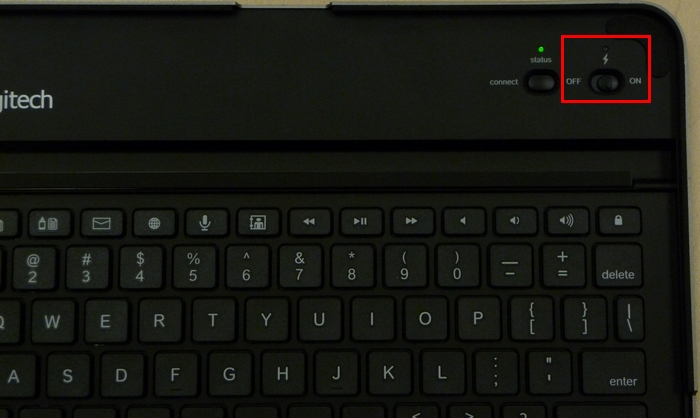
-
Charge the Logitech Keyboard Case for Samsung completely. See answer 360023240714 for charging instructions.
-
Restart your Samsung tablet by pressing and holding the Power/Lock key for 8 to 10 seconds or until the unit restarts. (Refer to your tablet's user manual to identify which is the Power/Lock key, if you're unsure.)
-
Make sure your keyboard is properly paired with your Samsung tablet. To reconnect it, see answer 360023240714 for instructions.
Contact information
Need help? See answer 25698 to contact Customer Care about this product.
Important Notice: The Firmware Update Tool is no longer supported or maintained by Logitech. We highly recommend using Logi Options+ for your supported Logitech devices. We are here to assist you during this transition.
Important Notice: The Logitech Preference Manager is no longer supported or maintained by Logitech. We highly recommend using Logi Options+ for your supported Logitech devices. We are here to assist you during this transition.
Important Notice: The Logitech Control Center is no longer supported or maintained by Logitech. We highly recommend using Logi Options+ for your supported Logitech devices. We are here to assist you during this transition.
Important Notice: The Logitech Connection Utility is no longer supported or maintained by Logitech. We highly recommend using Logi Options+ for your supported Logitech devices. We are here to assist you during this transition.
Important Notice: The Unifying Software is no longer supported or maintained by Logitech. We highly recommend using Logi Options+ for your supported Logitech devices. We are here to assist you during this transition.
Important Notice: The SetPoint software is no longer supported or maintained by Logitech. We highly recommend using Logi Options+ for your supported Logitech devices. We are here to assist you during this transition.
Frequently Asked Questions
There are no products available for this section
There are no Downloads for this Product
There are no Downloads for this Version
Compatible Product
