- On the PS3 Home menu, select Settings > Accessory Settings.
- In the Accessory Settings window, select Manage Bluetooth® Devices.
If you have registered one or more Bluetooth® devices, a list of registered devices is displayed. - In the Manage Bluetooth Devices window, select Register New Device.
If you haven’t registered any Bluetooth® devices, you’ll be prompted to register the device. Select Yes and then press X (Enter) to continue.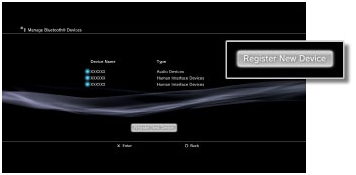
- Select Start Scanning.
During scanning, press the Reset button at the bottom of the keyboard to begin pairing. Your PS3™ system will display a list of all Bluetooth® devices within range of the system. - Select Cordless MediaBoard Pro™. Using the keyboard, complete registration by entering the on-screen pass key, and then press Enter to confirm the connection.
Important Notice: The Firmware Update Tool is no longer supported or maintained by Logitech. We highly recommend using Logi Options+ for your supported Logitech devices. We are here to assist you during this transition.
Important Notice: The Logitech Preference Manager is no longer supported or maintained by Logitech. We highly recommend using Logi Options+ for your supported Logitech devices. We are here to assist you during this transition.
Important Notice: The Logitech Control Center is no longer supported or maintained by Logitech. We highly recommend using Logi Options+ for your supported Logitech devices. We are here to assist you during this transition.
Important Notice: The Logitech Connection Utility is no longer supported or maintained by Logitech. We highly recommend using Logi Options+ for your supported Logitech devices. We are here to assist you during this transition.
Important Notice: The Unifying Software is no longer supported or maintained by Logitech. We highly recommend using Logi Options+ for your supported Logitech devices. We are here to assist you during this transition.
Important Notice: The SetPoint software is no longer supported or maintained by Logitech. We highly recommend using Logi Options+ for your supported Logitech devices. We are here to assist you during this transition.
Frequently Asked Questions
There are no products available for this section
There are no Downloads for this Product
There are no Downloads for this Version
Compatible Product
