If you have upgraded from previous Options+ version with Ps profile already created and Adobe Ps actions stopped working, try the following steps:
- Restart the Ps app and try the Adobe Ps actions again. If the actions are still not working, then continue with the remaining steps.
- Click on Plugins in the menu bar items, then click on Logi Options+ Ps and check the version number. If the version number of the plugin shows Logi Options+ Ps v0.90.4215 then you need to manually uninstall the plugin from Creative Cloud.

- Open Adobe Creative Cloud.
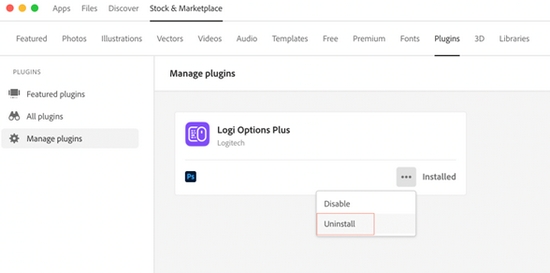
- Visit the Stock & Marketplace menu, click on the Plugins menu and in the left panel, select Manage plugins.
- Click on ‘...’ (more options) for Logi Options Plus and then click Uninstall.
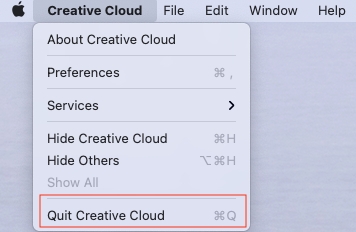
- Quit Creative Cloud by clicking on Creative Cloud in menu bar items and click Quit Creative Cloud.
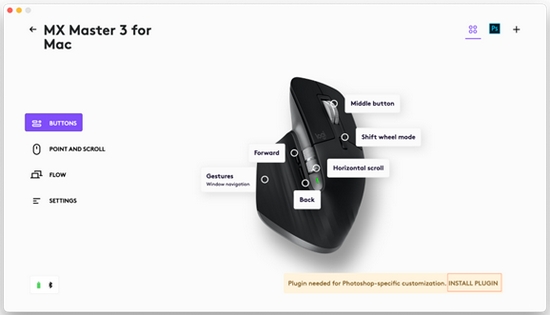
- Install the profile by clicking on INSTALL PLUGIN from the banner in bottom right corner.
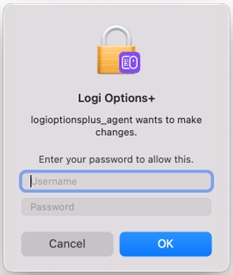
- Enter the password to install the plugin.
Important Notice: The Firmware Update Tool is no longer supported or maintained by Logitech. We highly recommend using Logi Options+ for your supported Logitech devices. We are here to assist you during this transition.
Important Notice: The Logitech Preference Manager is no longer supported or maintained by Logitech. We highly recommend using Logi Options+ for your supported Logitech devices. We are here to assist you during this transition.
Important Notice: The Logitech Control Center is no longer supported or maintained by Logitech. We highly recommend using Logi Options+ for your supported Logitech devices. We are here to assist you during this transition.
Important Notice: The Logitech Connection Utility is no longer supported or maintained by Logitech. We highly recommend using Logi Options+ for your supported Logitech devices. We are here to assist you during this transition.
Important Notice: The Unifying Software is no longer supported or maintained by Logitech. We highly recommend using Logi Options+ for your supported Logitech devices. We are here to assist you during this transition.
Important Notice: The SetPoint software is no longer supported or maintained by Logitech. We highly recommend using Logi Options+ for your supported Logitech devices. We are here to assist you during this transition.
Frequently Asked Questions
There are no products available for this section
There are no Downloads for this Product
There are no Downloads for this Version
Compatible Product
