If your device becomes unpaired or you receive a replacement LIGHTSPEED wireless adapter, do the following to pair your device:
-
Turn your headset ON in LIGHTSPEED mode.
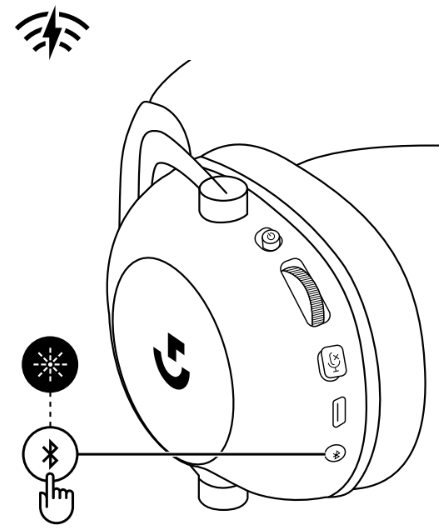
-
Plug the LIGHTSPEED receiver into the host device. (If it’s already plugged in, un-plug and then plug it back in.)
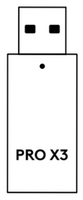
-
Remove the left earpad cushion.
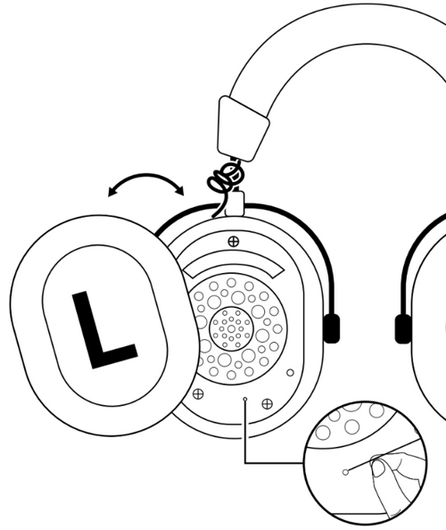
- Use a paperclip to long press the headset pairing button. The headset will blink and chime.
-
Use a paperclip to press the LIGHTSPEED receiver pairing button. The light on the adapter will blink.
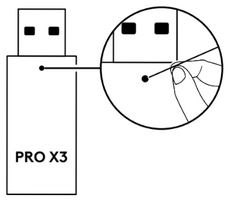
- Wait 10-15 seconds for pairing to complete. Blinking will stop on both the headset and adapter and you'll hear a chime in the headset to indicate pairing is complete.
Important Notice: The Firmware Update Tool is no longer supported or maintained by Logitech. We highly recommend using Logi Options+ for your supported Logitech devices. We are here to assist you during this transition.
Important Notice: The Logitech Preference Manager is no longer supported or maintained by Logitech. We highly recommend using Logi Options+ for your supported Logitech devices. We are here to assist you during this transition.
Important Notice: The Logitech Control Center is no longer supported or maintained by Logitech. We highly recommend using Logi Options+ for your supported Logitech devices. We are here to assist you during this transition.
Important Notice: The Logitech Connection Utility is no longer supported or maintained by Logitech. We highly recommend using Logi Options+ for your supported Logitech devices. We are here to assist you during this transition.
Important Notice: The Unifying Software is no longer supported or maintained by Logitech. We highly recommend using Logi Options+ for your supported Logitech devices. We are here to assist you during this transition.
Important Notice: The SetPoint software is no longer supported or maintained by Logitech. We highly recommend using Logi Options+ for your supported Logitech devices. We are here to assist you during this transition.
Frequently Asked Questions
There are no products available for this section
There are no Downloads for this Product
There are no Downloads for this Version
Compatible Product
