Battery information
The Logitech Spotlight 2 comes with a rechargeable and replaceable battery. It takes about 60 minutes to fully charge your Spotlight 2 remote.
A minimum of one minute charging gives you enough power for a full presentation use (up to three hours). Depending on how you use your Spotlight 2, a full charge can last up to 90 days.
To charge presentation remote, follow the steps below:
-
Remove the USB-C receiver from the bottom of your Spotlight 2.
The USB-C port is located inside the USB receiver slot on your presentation remote.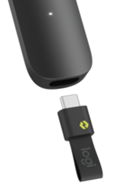
TIP: Check inside the slot and make sure there isn’t any debris inside the USB receiver slot on your Spotlight 2 device.
-
Connect one end of the charging cable (not included) to the USB-C port on the Spotlight 2 and the other end to a USB power source.
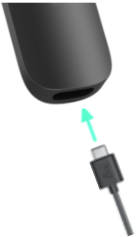
- Once your presentation remote is plugged in, a green LED will pulse and it will start charging. For more information see Logitech Spotlight 2 LED status indicator.
NOTE: Even when fully charged, if your Spotlight 2 remote is not used for approximately 18 months the battery will drain and will need to be replaced.
Important Notice: The Firmware Update Tool is no longer supported or maintained by Logitech. We highly recommend using Logi Options+ for your supported Logitech devices. We are here to assist you during this transition.
Important Notice: The Logitech Preference Manager is no longer supported or maintained by Logitech. We highly recommend using Logi Options+ for your supported Logitech devices. We are here to assist you during this transition.
Important Notice: The Logitech Control Center is no longer supported or maintained by Logitech. We highly recommend using Logi Options+ for your supported Logitech devices. We are here to assist you during this transition.
Important Notice: The Logitech Connection Utility is no longer supported or maintained by Logitech. We highly recommend using Logi Options+ for your supported Logitech devices. We are here to assist you during this transition.
Important Notice: The Unifying Software is no longer supported or maintained by Logitech. We highly recommend using Logi Options+ for your supported Logitech devices. We are here to assist you during this transition.
Important Notice: The SetPoint software is no longer supported or maintained by Logitech. We highly recommend using Logi Options+ for your supported Logitech devices. We are here to assist you during this transition.
Frequently Asked Questions
There are no products available for this section
There are no Downloads for this Product
There are no Downloads for this Version
Compatible Product
