Your Yeti 2 offers the polar patterns listed below to select from. You can also customize this feature through the Custom option, available in the same menu.
Navigate to the fourth option listed inside the BLUE VO!CE menu to enter the Pattern menu.
- Auto Tracking
- Hyper focused
- Super focused
- Cardioid (standard)
- Omnidirectional (Capture 360)
- Figure 8 (Duet / Interview)
- Stereo
- Custom
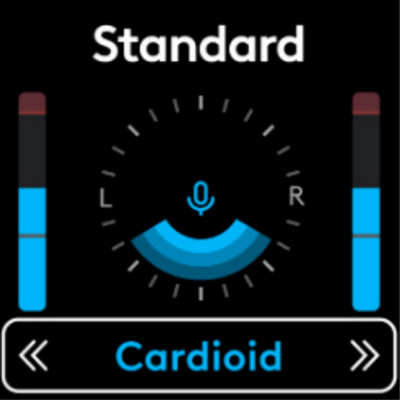
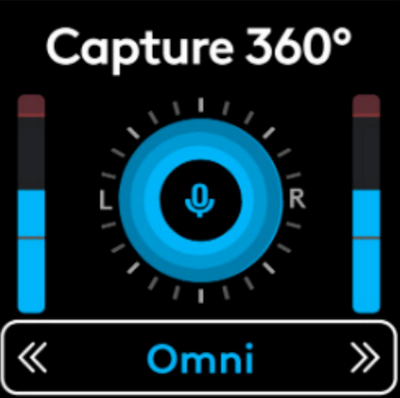
The blue shaded area on the screen represents where the mic is aiming. For example, in Cardioid, it will capture the most sound directly in front of the mic, but in Omnidirectional, it will capture sounds from all directions.
Important Notice: The Firmware Update Tool is no longer supported or maintained by Logitech. We highly recommend using Logi Options+ for your supported Logitech devices. We are here to assist you during this transition.
Important Notice: The Logitech Preference Manager is no longer supported or maintained by Logitech. We highly recommend using Logi Options+ for your supported Logitech devices. We are here to assist you during this transition.
Important Notice: The Logitech Control Center is no longer supported or maintained by Logitech. We highly recommend using Logi Options+ for your supported Logitech devices. We are here to assist you during this transition.
Important Notice: The Logitech Connection Utility is no longer supported or maintained by Logitech. We highly recommend using Logi Options+ for your supported Logitech devices. We are here to assist you during this transition.
Important Notice: The Unifying Software is no longer supported or maintained by Logitech. We highly recommend using Logi Options+ for your supported Logitech devices. We are here to assist you during this transition.
Important Notice: The SetPoint software is no longer supported or maintained by Logitech. We highly recommend using Logi Options+ for your supported Logitech devices. We are here to assist you during this transition.
Frequently Asked Questions
There are no products available for this section
There are no Downloads for this Product
There are no Downloads for this Version
Compatible Product
