If you are using a Logitech Camera, you may discover that changes in brightness are compensated by the camera, so you don't get the effects you were trying to achieve. This is because Logitech cameras have auto exposure that make the most of ambient lighting.
To turn off auto exposure:
-
G Hub
Go to your camera setting in G Hub, select New Camera Mode, and then turn off Auto Exposure.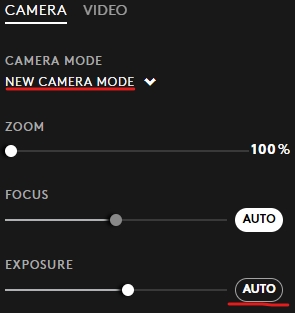
-
Logi Options+
Go to your camera setting in Logi Options+.
Click Camera Settings at the bottom of the video preview.
Click Exposure and toggle off Auto exposure.
This will let you make the brightness and color temperature adjustments for the look you want.
Important Notice: The Firmware Update Tool is no longer supported or maintained by Logitech. We highly recommend using Logi Options+ for your supported Logitech devices. We are here to assist you during this transition.
Important Notice: The Logitech Preference Manager is no longer supported or maintained by Logitech. We highly recommend using Logi Options+ for your supported Logitech devices. We are here to assist you during this transition.
Important Notice: The Logitech Control Center is no longer supported or maintained by Logitech. We highly recommend using Logi Options+ for your supported Logitech devices. We are here to assist you during this transition.
Important Notice: The Logitech Connection Utility is no longer supported or maintained by Logitech. We highly recommend using Logi Options+ for your supported Logitech devices. We are here to assist you during this transition.
Important Notice: The Unifying Software is no longer supported or maintained by Logitech. We highly recommend using Logi Options+ for your supported Logitech devices. We are here to assist you during this transition.
Important Notice: The SetPoint software is no longer supported or maintained by Logitech. We highly recommend using Logi Options+ for your supported Logitech devices. We are here to assist you during this transition.
Frequently Asked Questions
There are no products available for this section
There are no Downloads for this Product
There are no Downloads for this Version
Compatible Product
