The pairing process for the 890/895, the 1000 and 1100 has been integrated into the update procedure. Updating the remote and extender automatically pairs them together.
For the update procedure to pair your remote and extender correctly, please ensure the following;
- Download and install the latest Logitech Harmony Remote Software. To download the latest software click here
- Upgrade to the latest firmware on the RF Wireless Extender. For how-to steps please see 360023220634 - Upgrading/Reapplying the firmware on your Harmony Remote
- Click on the
 button and follow the onscreen steps to update your Harmony remote and Wireless Extender
Note: If the extender does not respond to the remote following an update, the two most likely causes are:
- The connect button was pressed on the extender, causing it to enter a pairing mode which blocks all communication from the remote
- Interference from other electronic devices can block communication between the remote and the extender
If the Status light is lit:
If the Connect button is accidentally pressed for 2 seconds, the Status light will come on and the extender will enter a pairing mode, causing the extender to not respond to the remote.
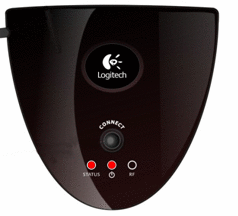
In normal use, only the power light should be on. If the status light is lit, simply press the connect button once. The status light should blink and then go out.

If the Status light is not lit but the extender is still not responding, please try updating again.
Interference issues:
RF interference from other electrical devices such as cordless phones and baby monitors can cause the extender to not receive commands from the remote. Try turning off other electronic devices to see if this is the problem.
Important Notice: The Firmware Update Tool is no longer supported or maintained by Logitech. We highly recommend using Logi Options+ for your supported Logitech devices. We are here to assist you during this transition.
Important Notice: The Logitech Preference Manager is no longer supported or maintained by Logitech. We highly recommend using Logi Options+ for your supported Logitech devices. We are here to assist you during this transition.
Important Notice: The Logitech Control Center is no longer supported or maintained by Logitech. We highly recommend using Logi Options+ for your supported Logitech devices. We are here to assist you during this transition.
Important Notice: The Logitech Connection Utility is no longer supported or maintained by Logitech. We highly recommend using Logi Options+ for your supported Logitech devices. We are here to assist you during this transition.
Important Notice: The Unifying Software is no longer supported or maintained by Logitech. We highly recommend using Logi Options+ for your supported Logitech devices. We are here to assist you during this transition.
Important Notice: The SetPoint software is no longer supported or maintained by Logitech. We highly recommend using Logi Options+ for your supported Logitech devices. We are here to assist you during this transition.
Frequently Asked Questions
There are no products available for this section
There are no Downloads for this Product
There are no Downloads for this Version
Compatible Product
