Using SetPoint, you can adjust the pointer speed and scrolling size.
To change the mouse movements on your S 510 mouse:
-
Open SetPoint (Start > Programs > Logitech > Mouse and Keyboard > Mouse and Keyboard Settings).
If you do not have SetPoint installed you can download it on our S 510 Downloads Page.
-
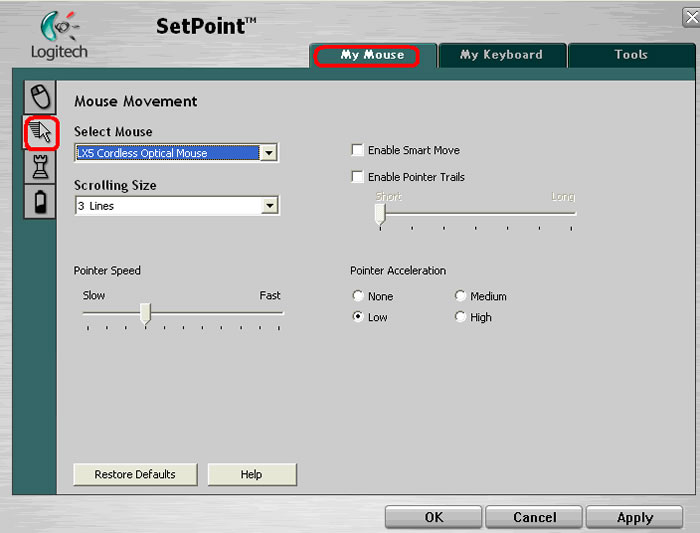
Select the My Mouse tab at the top of the window and click the Mouse Movement tab on the left (as shown above).
-
Use the drop down menus, sliders, and check boxes to configure your mouse S 510 mouse settings. You can also click Help on this screen to find detailed descriptions of these options for your device.
-
Click Apply to save your settings. Click OK to exit SetPoint.
Important Notice: The Firmware Update Tool is no longer supported or maintained by Logitech. We highly recommend using Logi Options+ for your supported Logitech devices. We are here to assist you during this transition.
Important Notice: The Logitech Preference Manager is no longer supported or maintained by Logitech. We highly recommend using Logi Options+ for your supported Logitech devices. We are here to assist you during this transition.
Important Notice: The Logitech Control Center is no longer supported or maintained by Logitech. We highly recommend using Logi Options+ for your supported Logitech devices. We are here to assist you during this transition.
Important Notice: The Logitech Connection Utility is no longer supported or maintained by Logitech. We highly recommend using Logi Options+ for your supported Logitech devices. We are here to assist you during this transition.
Important Notice: The Unifying Software is no longer supported or maintained by Logitech. We highly recommend using Logi Options+ for your supported Logitech devices. We are here to assist you during this transition.
Important Notice: The SetPoint software is no longer supported or maintained by Logitech. We highly recommend using Logi Options+ for your supported Logitech devices. We are here to assist you during this transition.
Frequently Asked Questions
There are no products available for this section
There are no Downloads for this Product
There are no Downloads for this Version
Compatible Product
