Analog magnetic switches have the capability to be dynamic in setting actuation points between 0.1 mm to 4.0 mm. These are unlike our traditional mechanical switches (Tactile, Linear, and Clicky), which have different feedback and actuation points. The new analog magnetic key switch unlocks three new capabilities for the user:
| Term | Definition |
| Actuation Point | The distance a key needs to be pressed down before it registers as a keystroke. |
| Rapid Trigger | Dynamically activates and deactivates the key based on travel distance. |
| Multi Actions | You are able to assign two actions to one single key. |
NOTE: These are G HUB software-dependent.
Actuation Point:
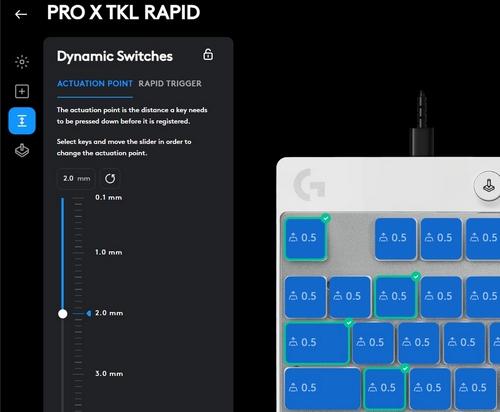
Actuation Point (or Operating Position) is the key travel distance where the key is actually recognized by the keyboard. The actuation force is the force required at this point. In other words, it’s how hard you have to press the key for it to be recognized.
-
Actuation Point set for Per Key
-
Actuation Point set for all Keys
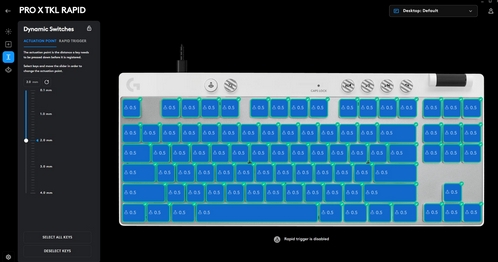
The Actuation Point is adjustable between the range of 0.1mm - 4.0mm and a minimum of 0.1mm. The higher the number, the less sensitive it becomes. For gaming, we recommend a sweet spot of 1~2 mm and for the office, 3mm.
Rapid Trigger:
Rapid trigger dynamically changes the actuation and deactivation point. Your keys will activate when you intend to press them and deactivate when you intend to let go. You can repeat a key press mid-motion without needing to surpass a fixed reset or actuation point for a rapid press. Rapid trigger sensitivity can be applied for per key or all keys. However, the sensitivity remains constant.
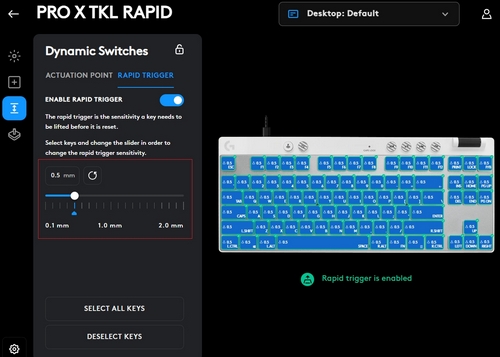
Whatever the sensitivity is, the rapid trigger will reset a key’s actuation the moment /distance the key is released. For example, if your actuation is 1.0mm and your rapid trigger is 0.15mm when pressing the key, you have to hit 1.0mm to actuate it. When you release the key at 0.15mm, the rapid trigger resets the key and you can actuate the key again without having to travel back up to 1.0mm. This makes the key respond instantly for fast-paced games like FPS.
Multi actions:
You can assign two different actions in one single key. For example, Key A will be assigned to type W at 1.0mm actuation point and Key A will be assigned to type Shift+w at 2.0mm actuation point.
The figures shown illustrate remapping a multi-action to a key.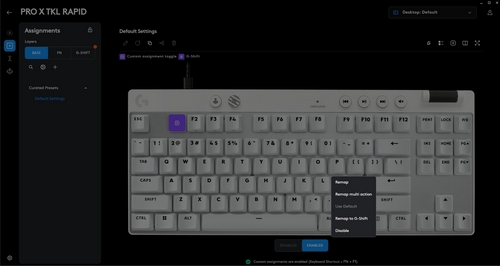
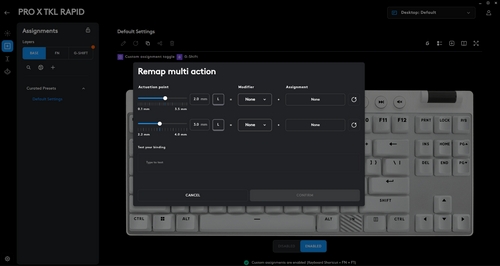
NOTE: Multi-actions can only be assigned on the base layer and only if the rapid trigger is disabled.
Important Notice: The Firmware Update Tool is no longer supported or maintained by Logitech. We highly recommend using Logi Options+ for your supported Logitech devices. We are here to assist you during this transition.
Important Notice: The Logitech Preference Manager is no longer supported or maintained by Logitech. We highly recommend using Logi Options+ for your supported Logitech devices. We are here to assist you during this transition.
Important Notice: The Logitech Control Center is no longer supported or maintained by Logitech. We highly recommend using Logi Options+ for your supported Logitech devices. We are here to assist you during this transition.
Important Notice: The Logitech Connection Utility is no longer supported or maintained by Logitech. We highly recommend using Logi Options+ for your supported Logitech devices. We are here to assist you during this transition.
Important Notice: The Unifying Software is no longer supported or maintained by Logitech. We highly recommend using Logi Options+ for your supported Logitech devices. We are here to assist you during this transition.
Important Notice: The SetPoint software is no longer supported or maintained by Logitech. We highly recommend using Logi Options+ for your supported Logitech devices. We are here to assist you during this transition.
Frequently Asked Questions
There are no products available for this section
There are no Downloads for this Product
There are no Downloads for this Version
Compatible Product
