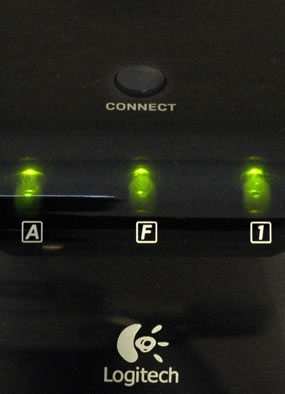
Your S 510 receiver has 3 indicator lights (LEDs) that display the status of the Caps lock, Function key, and the Num lock during normal operating mode. These lights will also flash when the connect button on the receiver is pressed.
LED A: Indicates that the Caps Lock (Capital lock) key is on when lit.
LED F: Indicates that the F keys are in Standard F Keys Mode when lit and in Enhanced F Keys Mode when the LED is off.
- Your S 510 keyboard has an Enhanced F Keys Mode for F keys that provides additional functions you can program. See Knowledge Base article 360023212294.
LED 1: Indicates when the Num Lock (Number lock) key is on. This function allows the number pad to produce only numbers.
NOTE: When first connecting your S 510 mouse and keyboard, these three lights will flash and light briefly to indicate your S 510 was successfully connected.
Important Notice: The Firmware Update Tool is no longer supported or maintained by Logitech. We highly recommend using Logi Options+ for your supported Logitech devices. We are here to assist you during this transition.
Important Notice: The Logitech Preference Manager is no longer supported or maintained by Logitech. We highly recommend using Logi Options+ for your supported Logitech devices. We are here to assist you during this transition.
Important Notice: The Logitech Control Center is no longer supported or maintained by Logitech. We highly recommend using Logi Options+ for your supported Logitech devices. We are here to assist you during this transition.
Important Notice: The Logitech Connection Utility is no longer supported or maintained by Logitech. We highly recommend using Logi Options+ for your supported Logitech devices. We are here to assist you during this transition.
Important Notice: The Unifying Software is no longer supported or maintained by Logitech. We highly recommend using Logi Options+ for your supported Logitech devices. We are here to assist you during this transition.
Important Notice: The SetPoint software is no longer supported or maintained by Logitech. We highly recommend using Logi Options+ for your supported Logitech devices. We are here to assist you during this transition.
Frequently Asked Questions
There are no products available for this section
There are no Downloads for this Product
There are no Downloads for this Version
Compatible Product
