If your Z-5500 control pod no longer turns on, do the following:
-
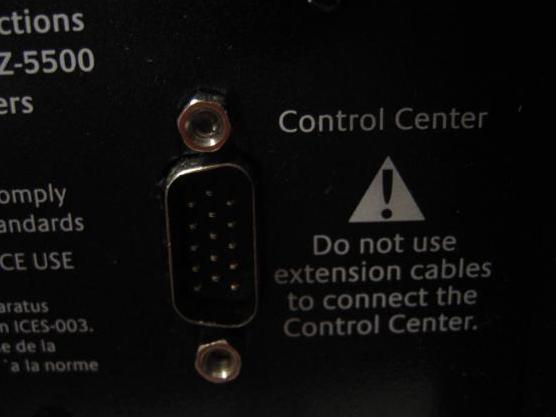
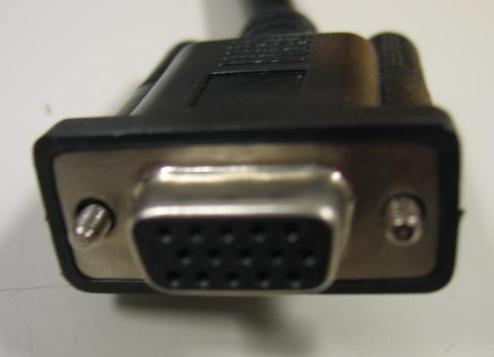
Check the connector between the subwoofer and the control pod for bent pins. The connectors should look as shown below:
-
Make sure that the cable from the control pod is securely connected to the subwoofer. The screw-pins should be hand-tight.
NOTE: The control pod cable cannot be extended with a VGA cable. If you have done this, your control pod will not turn on and also voids your warranty.
-
Make sure that your Z-5500 is plugged into a functioning AC outlet. If you are not sure, try plugging the Z-5500 into a different outlet.
-
Check to see that the fuse is good. The fuse is located on the back of the subwoofer as shown below:
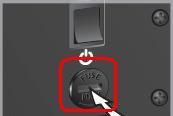
To determine if your fuse is good or not and for instructions on replacing your fuse, consult Knowledge Base article 360023214034.
NOTE: If the fuse is blown, the control pod will not turn on.
Important Notice: The Firmware Update Tool is no longer supported or maintained by Logitech. We highly recommend using Logi Options+ for your supported Logitech devices. We are here to assist you during this transition.
Important Notice: The Logitech Preference Manager is no longer supported or maintained by Logitech. We highly recommend using Logi Options+ for your supported Logitech devices. We are here to assist you during this transition.
Important Notice: The Logitech Control Center is no longer supported or maintained by Logitech. We highly recommend using Logi Options+ for your supported Logitech devices. We are here to assist you during this transition.
Important Notice: The Logitech Connection Utility is no longer supported or maintained by Logitech. We highly recommend using Logi Options+ for your supported Logitech devices. We are here to assist you during this transition.
Important Notice: The Unifying Software is no longer supported or maintained by Logitech. We highly recommend using Logi Options+ for your supported Logitech devices. We are here to assist you during this transition.
Important Notice: The SetPoint software is no longer supported or maintained by Logitech. We highly recommend using Logi Options+ for your supported Logitech devices. We are here to assist you during this transition.
Frequently Asked Questions
There are no products available for this section
There are no Downloads for this Product
There are no Downloads for this Version
Compatible Product
