To resolve this issue, do the following:
-
Make sure a fresh battery is installed. Low or dead batteries can affect mouse movements. See Knowledge Base article 360023391333 for instructions on replacing mouse batteries.
-
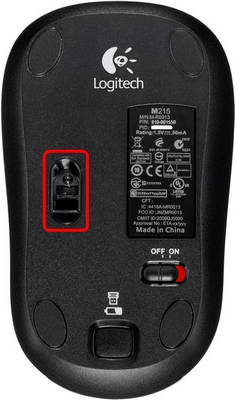
Turn off your M215 mouse and try cleaning the mouse sensor (shown below) with a soft cloth or a Q-tip.
-
Use a mouse pad and avoid using your mouse on the following surfaces:
- Glass or other see-through surfaces.
- Reflective surface such as a mirror or metal.
- Wood grains and grooved surfaces.
-
Plug the USB receiver directly and securely into a working USB port on your computer.
-
Re-locate your USB receiver to a different location and move your mouse closer to the receiver.
Additional Information:
If the above solutions do not resolve your problem, consult Knowledge Base article 14451 for instructions on contacting Logitech Technical Support.
Important Notice: The Firmware Update Tool is no longer supported or maintained by Logitech. We highly recommend using Logi Options+ for your supported Logitech devices. We are here to assist you during this transition.
Important Notice: The Logitech Preference Manager is no longer supported or maintained by Logitech. We highly recommend using Logi Options+ for your supported Logitech devices. We are here to assist you during this transition.
Important Notice: The Logitech Control Center is no longer supported or maintained by Logitech. We highly recommend using Logi Options+ for your supported Logitech devices. We are here to assist you during this transition.
Important Notice: The Logitech Connection Utility is no longer supported or maintained by Logitech. We highly recommend using Logi Options+ for your supported Logitech devices. We are here to assist you during this transition.
Important Notice: The Unifying Software is no longer supported or maintained by Logitech. We highly recommend using Logi Options+ for your supported Logitech devices. We are here to assist you during this transition.
Important Notice: The SetPoint software is no longer supported or maintained by Logitech. We highly recommend using Logi Options+ for your supported Logitech devices. We are here to assist you during this transition.
Frequently Asked Questions
There are no products available for this section
There are no Downloads for this Product
There are no Downloads for this Version
Compatible Product
