This guide provides clear steps to resolve duplicate Blue microphone entries appearing in your Mac's Input device list.
Open System Settings on your Mac device.
Select General > Login Items & Extensions (scroll down).
Select Logitech G HUB Driver Extensions.
Enable the Logitech G HUB HID Driver Extension and the Logitech Blue Voice Extension in the menu (as shown below).
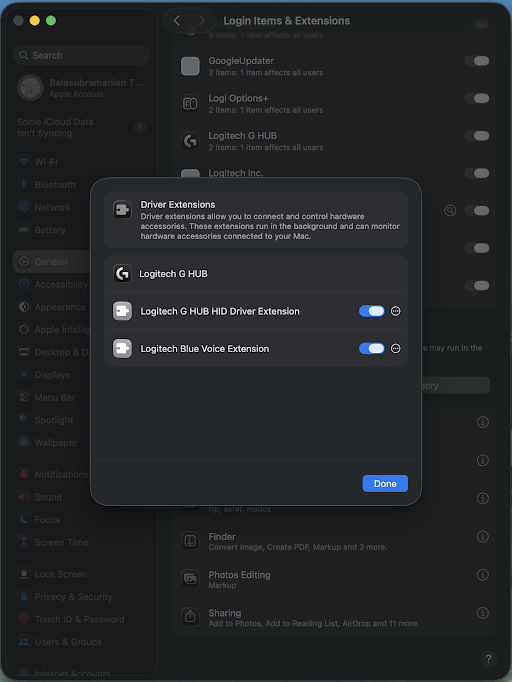
Enable/Allow G HUB from the list of applications. (This helps G HUB to unblock the Logitech HID & BLUE Vo!ce drivers).
To verify if the settings are successful, open Terminal on your Mac device.
Enter the command $ systemextensionsctl list
The Terminal will display Logitech Blue Voice Extension and G HUB HID Driver Extension as [activated enabled]. Click here for screenshot reference.
Repeat the process if necessary.
Important Notice: The Firmware Update Tool is no longer supported or maintained by Logitech. We highly recommend using Logi Options+ for your supported Logitech devices. We are here to assist you during this transition.
Important Notice: The Logitech Preference Manager is no longer supported or maintained by Logitech. We highly recommend using Logi Options+ for your supported Logitech devices. We are here to assist you during this transition.
Important Notice: The Logitech Control Center is no longer supported or maintained by Logitech. We highly recommend using Logi Options+ for your supported Logitech devices. We are here to assist you during this transition.
Important Notice: The Logitech Connection Utility is no longer supported or maintained by Logitech. We highly recommend using Logi Options+ for your supported Logitech devices. We are here to assist you during this transition.
Important Notice: The Unifying Software is no longer supported or maintained by Logitech. We highly recommend using Logi Options+ for your supported Logitech devices. We are here to assist you during this transition.
Important Notice: The SetPoint software is no longer supported or maintained by Logitech. We highly recommend using Logi Options+ for your supported Logitech devices. We are here to assist you during this transition.
Frequently Asked Questions
There are no products available for this section
There are no Downloads for this Product
There are no Downloads for this Version
Compatible Product
