- Your Tarah earbuds are fitted with size 2 (medium) eargels out of the box. Place these firmly within your ears as shown below.
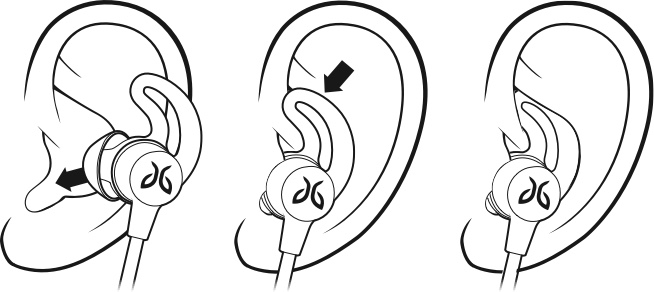
- If your earbuds are not comfortable or feel loose, try alternative sized eargels (size 1 or size 3). Follow the instructions “HOW DO I CHANGE THE EARGELS ON MY TARAH EARBUDS?” on how to do this. It is quite common to use different-sized eargels in each ear.
- Once you have a comfortable eargel fit, you can adjust the cord. Please follow the instructions “HOW DO I ADJUST THE CORD?”.
Important Notice: The Firmware Update Tool is no longer supported or maintained by Logitech. We highly recommend using Logi Options+ for your supported Logitech devices. We are here to assist you during this transition.
Important Notice: The Logitech Preference Manager is no longer supported or maintained by Logitech. We highly recommend using Logi Options+ for your supported Logitech devices. We are here to assist you during this transition.
Important Notice: The Logitech Control Center is no longer supported or maintained by Logitech. We highly recommend using Logi Options+ for your supported Logitech devices. We are here to assist you during this transition.
Important Notice: The Logitech Connection Utility is no longer supported or maintained by Logitech. We highly recommend using Logi Options+ for your supported Logitech devices. We are here to assist you during this transition.
Important Notice: The Unifying Software is no longer supported or maintained by Logitech. We highly recommend using Logi Options+ for your supported Logitech devices. We are here to assist you during this transition.
Important Notice: The SetPoint software is no longer supported or maintained by Logitech. We highly recommend using Logi Options+ for your supported Logitech devices. We are here to assist you during this transition.
Frequently Asked Questions
There are no products available for this section
There are no Downloads for this Product
There are no Downloads for this Version
Compatible Product
