To use your headset in wired mode:
- Ensure your headset is in LIGHTSPEED mode. If you are not in LIGHTSPEED mode, press the Bluetooth mode button until you hear the “LIGHTSPEED” voice prompt and the status LED glows white.
- Use the included USB-C to USB-A cable. Plug the USB-C end of the cable into the headset, and plug the USB-A side of the cable into your PC or Playstation.
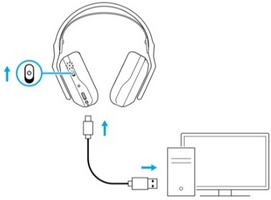
- Your device will automatically switch your primary audio source to USB wired. The status LED will begin to shine Cyan.
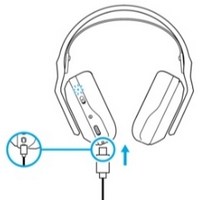
Even if your LIGHTSPEED USB adapter is still plugged in, the USB wired connection will take priority.
NOTE: LIGHTSPEED cannot be used while USB wired mode is active.
Important Notice: The Firmware Update Tool is no longer supported or maintained by Logitech. We highly recommend using Logi Options+ for your supported Logitech devices. We are here to assist you during this transition.
Important Notice: The Logitech Preference Manager is no longer supported or maintained by Logitech. We highly recommend using Logi Options+ for your supported Logitech devices. We are here to assist you during this transition.
Important Notice: The Logitech Control Center is no longer supported or maintained by Logitech. We highly recommend using Logi Options+ for your supported Logitech devices. We are here to assist you during this transition.
Important Notice: The Logitech Connection Utility is no longer supported or maintained by Logitech. We highly recommend using Logi Options+ for your supported Logitech devices. We are here to assist you during this transition.
Important Notice: The Unifying Software is no longer supported or maintained by Logitech. We highly recommend using Logi Options+ for your supported Logitech devices. We are here to assist you during this transition.
Important Notice: The SetPoint software is no longer supported or maintained by Logitech. We highly recommend using Logi Options+ for your supported Logitech devices. We are here to assist you during this transition.
Frequently Asked Questions
There are no products available for this section
There are no Downloads for this Product
There are no Downloads for this Version
Compatible Product
