The Logitech AV Stand for iPad can output video through the VIDEO OUT connector on the back of the device.
NOTE: The output supports 480i and will convert signals 480p and higher to 480i.
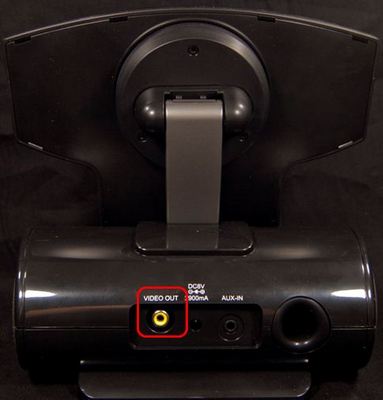
To use the video output:
-
Connect your AV stand to a TV using the supplied composite cable.
-
Set your TV or monitor to the correct input (see your device's documentation for help).
-
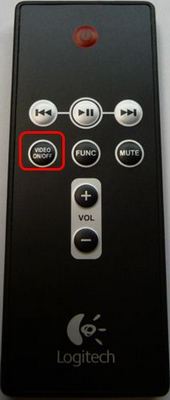
Press the VIDEO ON/OFF button on the remote to activate the video output.
-
Play video content from your iPad by using the play, pause, fast-forward, and rewind buttons as needed.
-
When finished, press the VIDEO ON/OFF button on the remote to turn off the video output.
NOTE: If the AV stand is set to stream video through the video output, video won't be displayed on the iPad screen.
Important Notice: The Firmware Update Tool is no longer supported or maintained by Logitech. We highly recommend using Logi Options+ for your supported Logitech devices. We are here to assist you during this transition.
Important Notice: The Logitech Preference Manager is no longer supported or maintained by Logitech. We highly recommend using Logi Options+ for your supported Logitech devices. We are here to assist you during this transition.
Important Notice: The Logitech Control Center is no longer supported or maintained by Logitech. We highly recommend using Logi Options+ for your supported Logitech devices. We are here to assist you during this transition.
Important Notice: The Logitech Connection Utility is no longer supported or maintained by Logitech. We highly recommend using Logi Options+ for your supported Logitech devices. We are here to assist you during this transition.
Important Notice: The Unifying Software is no longer supported or maintained by Logitech. We highly recommend using Logi Options+ for your supported Logitech devices. We are here to assist you during this transition.
Important Notice: The SetPoint software is no longer supported or maintained by Logitech. We highly recommend using Logi Options+ for your supported Logitech devices. We are here to assist you during this transition.
Frequently Asked Questions
There are no products available for this section
There are no Downloads for this Product
There are no Downloads for this Version
Compatible Product
