If you’ve connected your trackball to a USB port and it’s not working, try the following:
-
If you're using a USB hub, try connecting the mouse directly to a USB port on the computer instead.
-
Try moving the mouse to a different USB port on your computer.
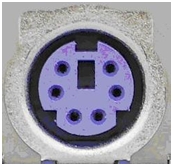
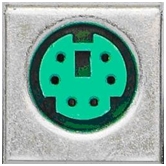
If you’ve connected your trackball to a PS/2 port using a USB-to-PS/2 adapter, make sure you’re using the PS/2 mouse port and not the PS/2 keyboard port:
PS/2 Keyboard port:
PS/2 Mouse port:
IMPORTANT: PS/2 ports are not hot-swappable. This means you must turn the computer off before plugging and unplugging PS/2 devices.
If your trackball is connected to the wrong port:
-
Turn off your computer.
-
Connect the trackball to the mouse port and make sure it’s firmly and securely connected to your computer.
-
Turn your computer back on.
Important Notice: The Firmware Update Tool is no longer supported or maintained by Logitech. We highly recommend using Logi Options+ for your supported Logitech devices. We are here to assist you during this transition.
Important Notice: The Logitech Preference Manager is no longer supported or maintained by Logitech. We highly recommend using Logi Options+ for your supported Logitech devices. We are here to assist you during this transition.
Important Notice: The Logitech Control Center is no longer supported or maintained by Logitech. We highly recommend using Logi Options+ for your supported Logitech devices. We are here to assist you during this transition.
Important Notice: The Logitech Connection Utility is no longer supported or maintained by Logitech. We highly recommend using Logi Options+ for your supported Logitech devices. We are here to assist you during this transition.
Important Notice: The Unifying Software is no longer supported or maintained by Logitech. We highly recommend using Logi Options+ for your supported Logitech devices. We are here to assist you during this transition.
Important Notice: The SetPoint software is no longer supported or maintained by Logitech. We highly recommend using Logi Options+ for your supported Logitech devices. We are here to assist you during this transition.
Frequently Asked Questions
There are no products available for this section
There are no Downloads for this Product
There are no Downloads for this Version
Compatible Product
