- Make sure that the G900 gaming mouse is directly connected to a USB port on your computer using the supplied USB cable or wireless USB receiver. For more information, see Connect the G900 gaming mouse to a computer.
NOTE: Avoid using USB hubs. - If the mouse is connected to your computer with the wireless USB receiver, please re-connect the wireless receiver to your computer using the supplied USB cable and USB adapter. This combination of parts will act as a extension that will help you to re-position the wireless receiver for optimal performance.
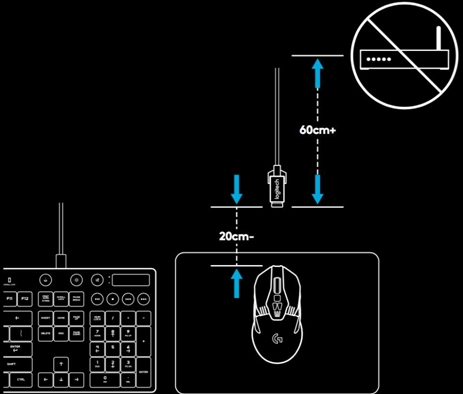
NOTE: Make sure to position the wireless receiver at least 60 cm (2 feet) away from all wireless routers and other 2.4 GHz wireless devices to minimize the possibility of environmental wireless interference.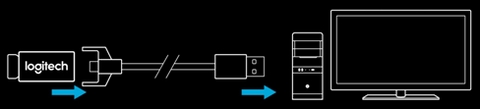
- Try using a different mouse pad.
- Avoid using your mouse directly on the following surfaces:
- Glass or other transparent surfaces
- Reflective surfaces such as a mirror or metal desk
- Wood grains and grooved surfaces
- Surfaces with a high-gloss finish
Additional Information
If the above steps don't you help resolve erratic cursor movement with your G900 gaming mouse, the issue may cause by software. For example, if the cursor speed is set to a high DPI setting, the cursor can move so quickly that it will appear erratic. You can customize pointer settings on your G900 gaming in Logitech Gaming Software. For details, see Customize G900 pointer settings with Logitech Gaming Software.
Important Notice: The Firmware Update Tool is no longer supported or maintained by Logitech. We highly recommend using Logi Options+ for your supported Logitech devices. We are here to assist you during this transition.
Important Notice: The Logitech Preference Manager is no longer supported or maintained by Logitech. We highly recommend using Logi Options+ for your supported Logitech devices. We are here to assist you during this transition.
Important Notice: The Logitech Control Center is no longer supported or maintained by Logitech. We highly recommend using Logi Options+ for your supported Logitech devices. We are here to assist you during this transition.
Important Notice: The Logitech Connection Utility is no longer supported or maintained by Logitech. We highly recommend using Logi Options+ for your supported Logitech devices. We are here to assist you during this transition.
Important Notice: The Unifying Software is no longer supported or maintained by Logitech. We highly recommend using Logi Options+ for your supported Logitech devices. We are here to assist you during this transition.
Important Notice: The SetPoint software is no longer supported or maintained by Logitech. We highly recommend using Logi Options+ for your supported Logitech devices. We are here to assist you during this transition.
Frequently Asked Questions
There are no products available for this section
There are no Downloads for this Product
There are no Downloads for this Version
Compatible Product
