PC
- Plug in the boom microphone.
- Plug the console/PC cable into the headset.
- Attach the PC splitter to the headset console/PC cable.
- Connect the G233 headset to your PC using the 3.5mm microphone and headphone plugs.
NOTE: Alternatively, you can connect the headset to your PC without using the splitter.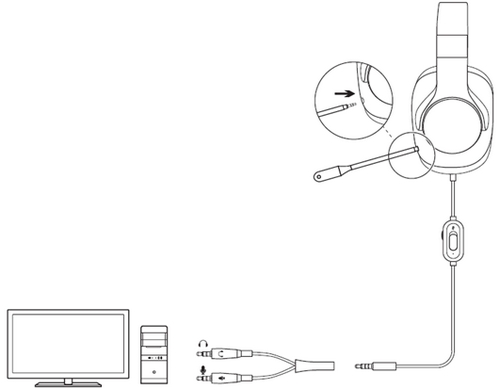
- Inline controls can be used to adjust volume level and mute the microphone.
Console
- Plug in the boom microphone.
- Plug the console/PC cable into the headset.
- Plug the other end of the console/PC cable into the controller.
NOTE: Instructions may vary based on your system version. Please check your console manual for additional guidance. Some Xbox One Control controllers may require the Xbox One Stereo Headset Adapter, sold separately.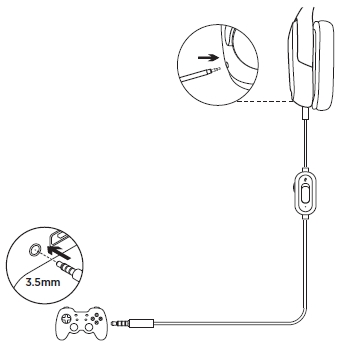
- Inline controls can be used to adjust volume level and mute the microphone.
Mobile
- Remove the boom microphone if it is attached to the headset.
- Plug the mobile cable into the headset.
- Plug the other end of the mobile cable into your mobile device (phone or tablet).
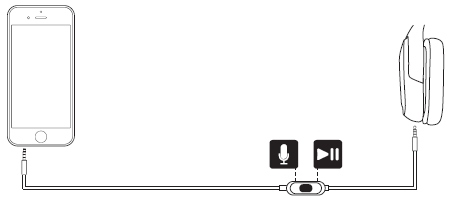
- The multi-function button on the mobile cable can be used to pick up or reject phone calls, pause, play, and skip to previous or next track.
Important Notice: The Firmware Update Tool is no longer supported or maintained by Logitech. We highly recommend using Logi Options+ for your supported Logitech devices. We are here to assist you during this transition.
Important Notice: The Logitech Preference Manager is no longer supported or maintained by Logitech. We highly recommend using Logi Options+ for your supported Logitech devices. We are here to assist you during this transition.
Important Notice: The Logitech Control Center is no longer supported or maintained by Logitech. We highly recommend using Logi Options+ for your supported Logitech devices. We are here to assist you during this transition.
Important Notice: The Logitech Connection Utility is no longer supported or maintained by Logitech. We highly recommend using Logi Options+ for your supported Logitech devices. We are here to assist you during this transition.
Important Notice: The Unifying Software is no longer supported or maintained by Logitech. We highly recommend using Logi Options+ for your supported Logitech devices. We are here to assist you during this transition.
Important Notice: The SetPoint software is no longer supported or maintained by Logitech. We highly recommend using Logi Options+ for your supported Logitech devices. We are here to assist you during this transition.
Frequently Asked Questions
There are no products available for this section
There are no Downloads for this Product
There are no Downloads for this Version
Compatible Product
