The M515 mouse is designed to track on fabric surfaces, such as on a couch or sofa. If you're using a reflective or polished surface, be sure to use a mouse pad.
This mouse has a hand-detection sensor built into it. The sensor has to be gripped in order to move the cursor. Make sure your hand is firmly in contact with the back and sides of the mouse when you're using it. You can learn more about hand-detection here.
Over time, dust or lint may gather over the sensor plate on the bottom of the M515 mouse. This could affect the tracking performance of the mouse and should be cleaned off.
IMPORTANT: If cleaned incorrectly, the sensor plate on the bottom of the M515 may get scratched, which could permanently affect the tracking performance of the mouse. You should only clean the sensor plate if dust or dirt obscures the tracking area. Be sure to follow the cleaning process described below.
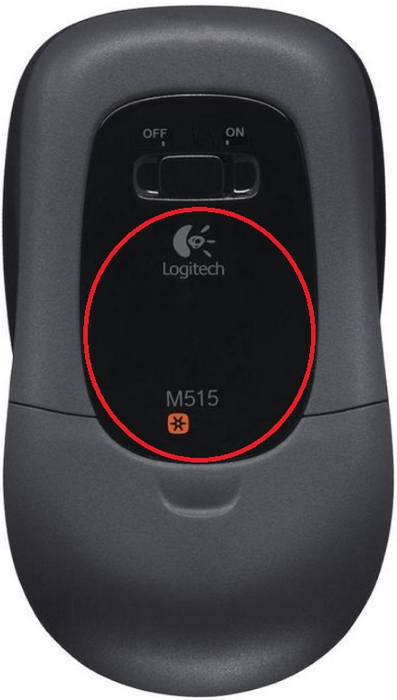
NOTE: The sensor area is circled in RED above..
To clean the sensor plate:
-
Use either a soft brush made of hair or pressurized air to remove solid particles from the surface. This will help to prevent scratching during the cleaning steps that follow. This step is often enough to remove all of the dust and dirt.
-
Get a cleaning tissue.
IMPORTANT: Never use Kleenex or paper towels as these are too abrasive. Always use a new cleaning tissue each time you wipe the surface over the sensor.
-
Apply a suitable cleaning solvent, such as water or alcohol (either denatured or isopropyl).
IMPORTANT: Never use acetone as it will damage the plastic material. Always put some cleaning solution on the tissue. Never wipe the surface with a dry cloth as this could scratch it.
-
Wipe the surface using the "drag" method. This is done by dragging the wet tissue over the surface in one direction only, avoiding any back and forth motion.
-
Discard the cleaning tissue after one wipe of the surface.
-
Repeat with another cleaning tissue, if necessary.
Important Notice: The Firmware Update Tool is no longer supported or maintained by Logitech. We highly recommend using Logi Options+ for your supported Logitech devices. We are here to assist you during this transition.
Important Notice: The Logitech Preference Manager is no longer supported or maintained by Logitech. We highly recommend using Logi Options+ for your supported Logitech devices. We are here to assist you during this transition.
Important Notice: The Logitech Control Center is no longer supported or maintained by Logitech. We highly recommend using Logi Options+ for your supported Logitech devices. We are here to assist you during this transition.
Important Notice: The Logitech Connection Utility is no longer supported or maintained by Logitech. We highly recommend using Logi Options+ for your supported Logitech devices. We are here to assist you during this transition.
Important Notice: The Unifying Software is no longer supported or maintained by Logitech. We highly recommend using Logi Options+ for your supported Logitech devices. We are here to assist you during this transition.
Important Notice: The SetPoint software is no longer supported or maintained by Logitech. We highly recommend using Logi Options+ for your supported Logitech devices. We are here to assist you during this transition.
Frequently Asked Questions
There are no products available for this section
There are no Downloads for this Product
There are no Downloads for this Version
Compatible Product
