The Logitech AV Stand has two audio inputs:
-
30-pin Apple dock connector.
-
Auxiliary connector on the back (for use with a standard 3.5mm jack).
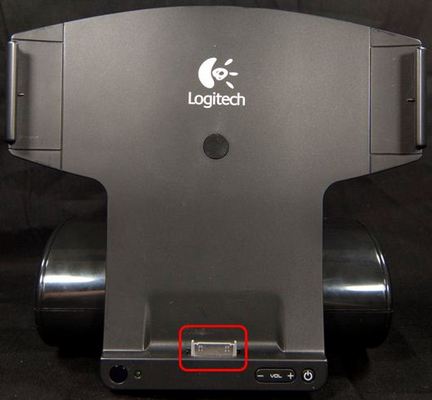
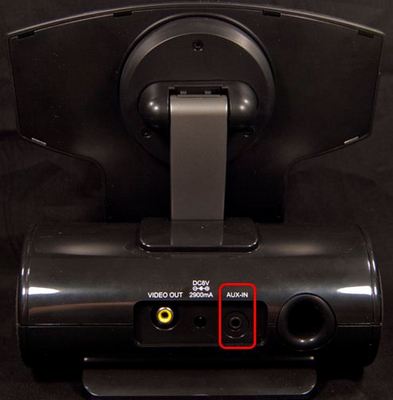
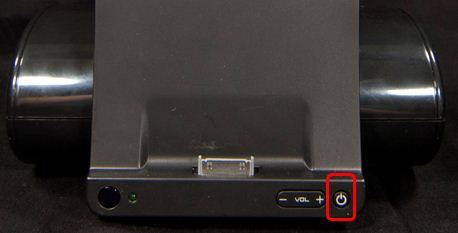
By default, when powering the stand on using either the power button on the stand or the remote, the stand will be set to the dock connector input
To switch between the auxiliary input and the dock connector input, you can either:
-
Press and release the power button on the stand.
OR
-
Press the function button on the remote
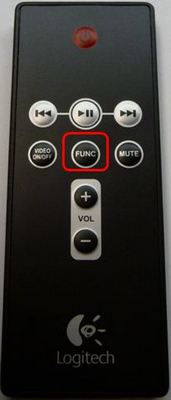
The indicator light will blink green to show that the input has been switched
NOTE: To turn off the stand, press the power button on the remote or hold the power button down on the stand until the light turns off.
Important Notice: The Firmware Update Tool is no longer supported or maintained by Logitech. We highly recommend using Logi Options+ for your supported Logitech devices. We are here to assist you during this transition.
Important Notice: The Logitech Preference Manager is no longer supported or maintained by Logitech. We highly recommend using Logi Options+ for your supported Logitech devices. We are here to assist you during this transition.
Important Notice: The Logitech Control Center is no longer supported or maintained by Logitech. We highly recommend using Logi Options+ for your supported Logitech devices. We are here to assist you during this transition.
Important Notice: The Logitech Connection Utility is no longer supported or maintained by Logitech. We highly recommend using Logi Options+ for your supported Logitech devices. We are here to assist you during this transition.
Important Notice: The Unifying Software is no longer supported or maintained by Logitech. We highly recommend using Logi Options+ for your supported Logitech devices. We are here to assist you during this transition.
Important Notice: The SetPoint software is no longer supported or maintained by Logitech. We highly recommend using Logi Options+ for your supported Logitech devices. We are here to assist you during this transition.
Frequently Asked Questions
There are no products available for this section
There are no Downloads for this Product
There are no Downloads for this Version
Compatible Product
