You may see the following event log error as shown below:
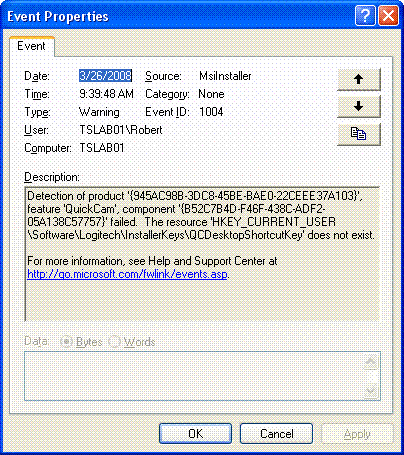
To resolve the event log errors, you will need to install the latest version of the QuickCam software. To install QuickCam software, do the following:
-
Go to the Downloads Page for the QuickCam Communicate STX.
-
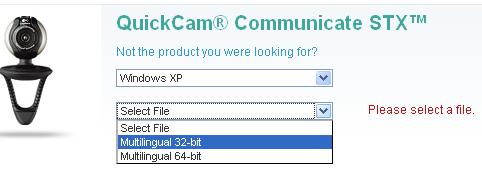
Select your operating system from the drop-down menu as shown below:

-
Select the file type from the drop-down menu as shown below:
NOTE: See Knowledge Base article 360023212274 for instructions on determining what operating system you have.
-
Click the Download Software button:

Remember the location where you download the file- you will need it when you install the new software.
-
Install the new version of QuickCam. For instructions on installing QuickCam, see Knowledge Base article 360023212274.
NOTE: You do not need to uninstall your existing version of QuickCam.
Important Notice: The Firmware Update Tool is no longer supported or maintained by Logitech. We highly recommend using Logi Options+ for your supported Logitech devices. We are here to assist you during this transition.
Important Notice: The Logitech Preference Manager is no longer supported or maintained by Logitech. We highly recommend using Logi Options+ for your supported Logitech devices. We are here to assist you during this transition.
Important Notice: The Logitech Control Center is no longer supported or maintained by Logitech. We highly recommend using Logi Options+ for your supported Logitech devices. We are here to assist you during this transition.
Important Notice: The Logitech Connection Utility is no longer supported or maintained by Logitech. We highly recommend using Logi Options+ for your supported Logitech devices. We are here to assist you during this transition.
Important Notice: The Unifying Software is no longer supported or maintained by Logitech. We highly recommend using Logi Options+ for your supported Logitech devices. We are here to assist you during this transition.
Important Notice: The SetPoint software is no longer supported or maintained by Logitech. We highly recommend using Logi Options+ for your supported Logitech devices. We are here to assist you during this transition.
Frequently Asked Questions
There are no products available for this section
There are no Downloads for this Product
There are no Downloads for this Version
Compatible Product
