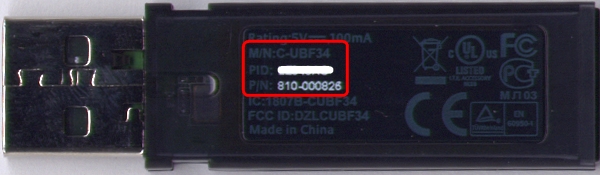
This problem occurs because the MX Revolution re-connection instructions are incorrect when using the replacement USB receiver (shown below) with the current version of either Logitech Mouse and Keyboard Software (SetPoint) or Logitech Control Center (LCC) installed.
Replacement USB receiver:
Part number: 810-000826
Model number: C-UBF34
Connecting your Mouse:
Follow the instructions shown below:
NOTE: The example shown below uses Windows screenshots. For Mac, the instructions are the same although the images may look different.
-
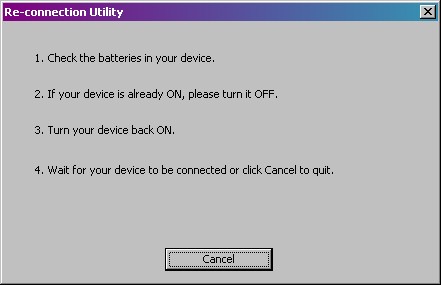
The incorrect connection instructions are as follows:
-
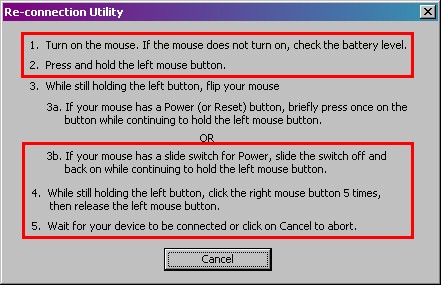
To re-connect your MX Revolution mouse, follow the instructions shown below:
-
Your mouse should now be connected to the USB receiver.
Additional Information:
If the above solutions do not resolve your problem, consult Knowledge Base article 9102 for instructions on contacting Logitech Technical Support.
Important Notice: The Firmware Update Tool is no longer supported or maintained by Logitech. We highly recommend using Logi Options+ for your supported Logitech devices. We are here to assist you during this transition.
Important Notice: The Logitech Preference Manager is no longer supported or maintained by Logitech. We highly recommend using Logi Options+ for your supported Logitech devices. We are here to assist you during this transition.
Important Notice: The Logitech Control Center is no longer supported or maintained by Logitech. We highly recommend using Logi Options+ for your supported Logitech devices. We are here to assist you during this transition.
Important Notice: The Logitech Connection Utility is no longer supported or maintained by Logitech. We highly recommend using Logi Options+ for your supported Logitech devices. We are here to assist you during this transition.
Important Notice: The Unifying Software is no longer supported or maintained by Logitech. We highly recommend using Logi Options+ for your supported Logitech devices. We are here to assist you during this transition.
Important Notice: The SetPoint software is no longer supported or maintained by Logitech. We highly recommend using Logi Options+ for your supported Logitech devices. We are here to assist you during this transition.
Frequently Asked Questions
There are no products available for this section
There are no Downloads for this Product
There are no Downloads for this Version
Compatible Product
