There are no Documents available for this Product. If you have questions, browse the topics on the left.
There are no Spare Parts available for this Product
There are no videos available for this product
There are no FAQs for this Software.
There are no Documents available for this Software. If you have questions, browse the topics on the left.
There are no Videos available for this Software.
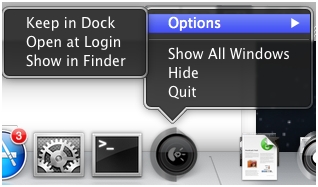
When you launch the Alert commander for Mac, it displays a small icon on the Mac's Dock.
To modify the settings for the Alert Commander Dock icon, click the icon.
The following selections are available:
Options
Keep in Dock — The icon will remain in the Dock for easy access even if you close the application.
Open at Login — Enables Alert Commander for Mac to launch automatically when you log in to your Mac.
Show in Finder — Opens a Finder window that contains the Alert Commander application.
Show All Windows
Hides all windows on the desktop except for the Alert Commander application. To reverse this action, right-click anywhere on the desktop.
Hide
Alert Commander closes its application window, displays a small icon on the Mac's Dock, and the application runs in background mode, continuing to record video. If Hide is selected, it changes to Show. Click Show to open the application window.
Quit
Exits the application.
Important Notice: Logitech Options has reached end of support and is no longer maintained. For the best experience with your supported Logitech devices, we recommend switching to Logi Options+, our next-generation customization software. Our team is here to help you during this transition.
Important Notice: The Presentation software is no longer supported or maintained by Logitech. Logitech Presentation devices are now supported by Logi Options+ for a better experience. We highly recommend using Logi Options+ with your presentation remotes. We are here to assist you during this transition.
As hardware and operating systems continue to evolve, legacy software eventually reaches a point where it can no longer be updated or maintained to current standards. Logitech Gaming Software (LGS) has been succeeded by G HUB for all new devices since 2019, and all hardware compatible with LGS is now out of warranty.
Effective October 31, 2026, all LGS installation files, download links, and support documentation will be permanently removed from the official Logitech website.
We understand some users may still want access to the installer in the future. We are currently exploring alternative resources to make this possible.
Important Notice: The Firmware Update Tool is no longer supported or maintained by Logitech. We highly recommend using Logi Options+ for your supported Logitech devices. We are here to assist you during this transition.
Important Notice: The Logitech Preference Manager is no longer supported or maintained by Logitech. We highly recommend using Logi Options+ for your supported Logitech devices. We are here to assist you during this transition.
Important Notice: The Logitech Control Center is no longer supported or maintained by Logitech. We highly recommend using Logi Options+ for your supported Logitech devices. We are here to assist you during this transition.
Important Notice: The Logitech Connection Utility is no longer supported or maintained by Logitech. We highly recommend using Logi Options+ for your supported Logitech devices. We are here to assist you during this transition.
Important Notice: The Unifying Software is no longer supported or maintained by Logitech. We highly recommend using Logi Options+ for your supported Logitech devices. We are here to assist you during this transition.
Important Notice: The SetPoint software is no longer supported or maintained by Logitech. We highly recommend using Logi Options+ for your supported Logitech devices. We are here to assist you during this transition.
Frequently Asked Questions
There are no products available for this section
There are no Downloads for this Product
Onboard Memory Manager is out of date. Please update to the most recent release.
Select Operating System to show Downloads.
There are no Downloads for Operating Systems not listed.