The Logitech FabricSkin Keyboard Folio connects to your iPad with Bluetooth.
To pair your iPad with your keyboard folio:
-
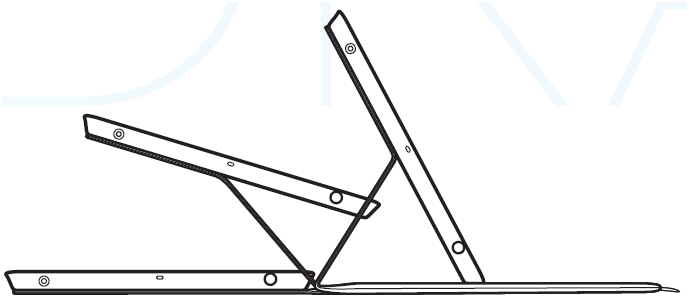
Move the iPad holder into typing position to automatically power-on the keyboard.
-
The status light will blink green for two seconds.
-
When the status light blinks blue, your keyboard folio is ready to pair with your iPad.
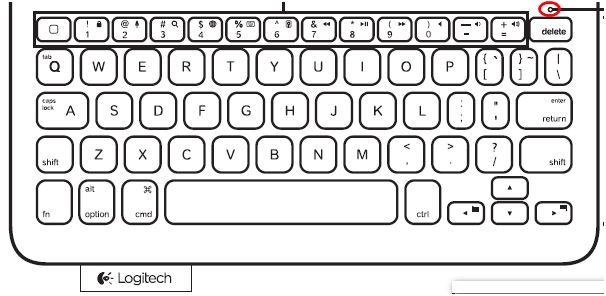
NOTE: If the status light turns red, you need to charge your keyboard battery. See answer 360023416873 for more information.
-
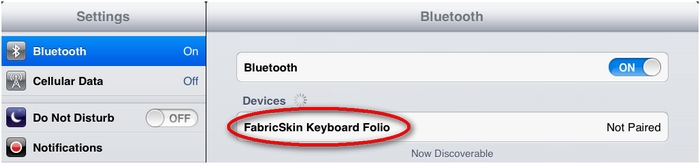
Go to Settings > Bluetooth on your iPad and make sure Bluetooth is on.
NOTE: Once the iPad discovers your FabricSkin Keyboard Folio, it will be listed in the Devices section.
-
Click FabricSkin Keyboard Folio to pair the keyboard with your iPad.
NOTE: If a PIN is required, type the PIN numbers on the FabricSkin Keyboard.
When the pairing is complete, the iPad will show the status of Connected for your FabricSkin Keyboard Folio. The status light on your keyboard will be solid blue.
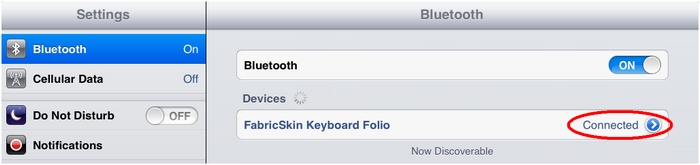
You should now be able to use the keyboard with any iPad application that accepts keyboard inputs.
Important Notice: The Firmware Update Tool is no longer supported or maintained by Logitech. We highly recommend using Logi Options+ for your supported Logitech devices. We are here to assist you during this transition.
Important Notice: The Logitech Preference Manager is no longer supported or maintained by Logitech. We highly recommend using Logi Options+ for your supported Logitech devices. We are here to assist you during this transition.
Important Notice: The Logitech Control Center is no longer supported or maintained by Logitech. We highly recommend using Logi Options+ for your supported Logitech devices. We are here to assist you during this transition.
Important Notice: The Logitech Connection Utility is no longer supported or maintained by Logitech. We highly recommend using Logi Options+ for your supported Logitech devices. We are here to assist you during this transition.
Important Notice: The Unifying Software is no longer supported or maintained by Logitech. We highly recommend using Logi Options+ for your supported Logitech devices. We are here to assist you during this transition.
Important Notice: The SetPoint software is no longer supported or maintained by Logitech. We highly recommend using Logi Options+ for your supported Logitech devices. We are here to assist you during this transition.
Frequently Asked Questions
There are no products available for this section
There are no Downloads for this Product
There are no Downloads for this Version
Compatible Product
