- The Z407 may not support your source device — make sure that your device is updated to the latest version.
- Unplug the USB cable on your source device and then plug it back in again.
Troubleshooting on a Windows system:
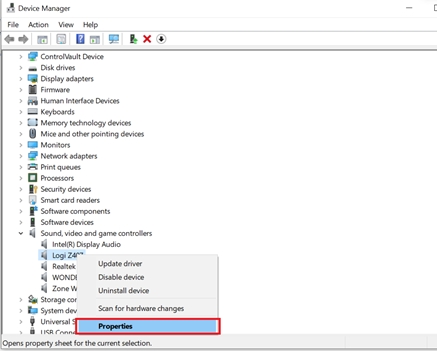
- In Device Manager, under Sound, video and game controllers, make sure the audio driver is updated to the latest version:
Right-click “Logi Z407” and select Properties.
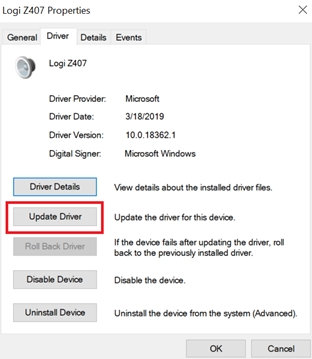
- Click Update Driver and choose Search automatically for updated driver software.
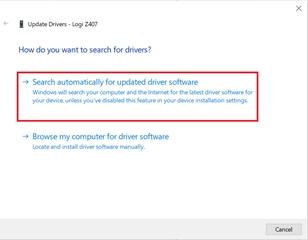
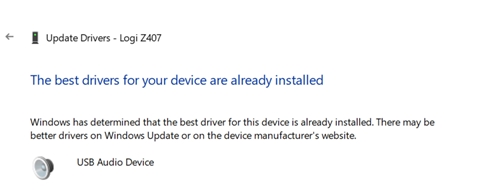
- Windows will search for and install the latest driver. If your driver is the latest version, it will appear as shown:
- Unplug your Z407. Reboot the computer and then power the Z407 back on.
- Play music from your computer to verify the music output.
Important Notice: The Firmware Update Tool is no longer supported or maintained by Logitech. We highly recommend using Logi Options+ for your supported Logitech devices. We are here to assist you during this transition.
Important Notice: The Logitech Preference Manager is no longer supported or maintained by Logitech. We highly recommend using Logi Options+ for your supported Logitech devices. We are here to assist you during this transition.
Important Notice: The Logitech Control Center is no longer supported or maintained by Logitech. We highly recommend using Logi Options+ for your supported Logitech devices. We are here to assist you during this transition.
Important Notice: The Logitech Connection Utility is no longer supported or maintained by Logitech. We highly recommend using Logi Options+ for your supported Logitech devices. We are here to assist you during this transition.
Important Notice: The Unifying Software is no longer supported or maintained by Logitech. We highly recommend using Logi Options+ for your supported Logitech devices. We are here to assist you during this transition.
Important Notice: The SetPoint software is no longer supported or maintained by Logitech. We highly recommend using Logi Options+ for your supported Logitech devices. We are here to assist you during this transition.
Frequently Asked Questions
There are no products available for this section
There are no Downloads for this Product
There are no Downloads for this Version
Compatible Product
